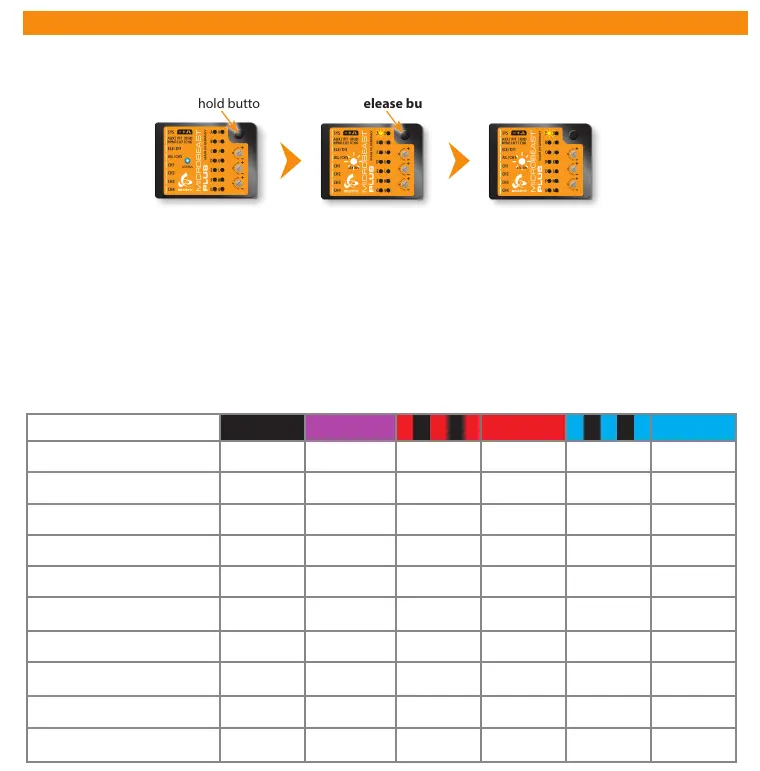
9. PARAMETER MENU
Entering Parameter menu
Menu point A - Swashplate quick trim (Menu LED A ashing)
Move the stick(s) for aileron and elevator to trim the swashplate into the desired direction. When using the tail gyro in Normal-
Rate mode you can store the last servo position by pressing and holding the button for 2 seconds. To delete all trimmings that
have recently been made briey push the rudder stick.
Operation mode
(Status LED is
blue or purple)
Press and hold button
Menu LED A ashing
Release button
Menu LED A ashing
(= Parameter menu point A)
The Parameter menu allows you to further customize the ight characteristics of the helicopter and the reaction of the system
to control inputs. You can nd a detailed description for each parameter in the MICROBEAST PLUS instruction manual.
Menu points B to K
Color and state of the Status LED indicate which option is currently selected at each menu point. By pushing the rudder stick
repeatedly you can cycle through the available options at each menu point and change the setting if necessary. Briey pushing
the button will skip to the next menu point. After the last menu point the system will exit Parameter menu and change back
to operation mode.
Status LED o purple ashing red red ashing blue blue
B
Control style User defined normal sport* pro extreme TX mode
C
Speed ight stability User defined very low low medium* high very high
D
Rudder rate consistency User defined very low low medium* high very high
E
Stick deadzone User defined very small small* medium large very large
F
Torque precompensation User defined off low - nor. high - nor. low - inv. high - inv.
G
Cyclic response User defined normal*
slightly
increased
increased aggressive
very
aggressive
H
Pitch boost User defined off* low medium high very high
I
Throttle response soft normal*
slightly
increased
increased aggressive
very
aggressive
J
Slow rampup speed User defined 50 rps 100 rps 200 rps* 300 rps 400 rps
K
Fast rampup speed User defined
using slow
rampup speed
300 rps 500 rps* 700 rps 900 rps



 To Next Page