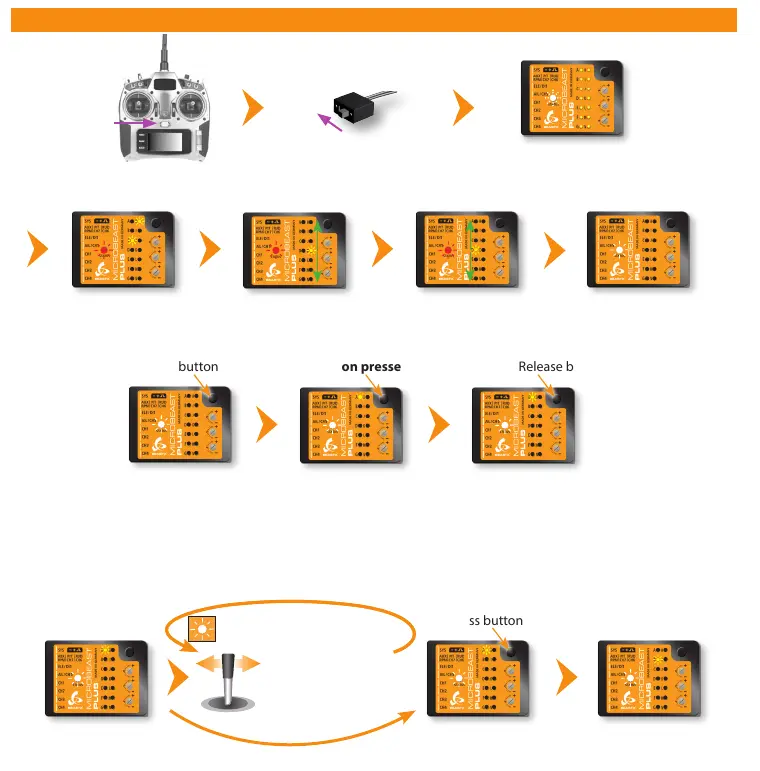
Move rudder stick
left or right
6. SETUPMENÜ
Switch on
power supply
Status LED lights up
red->blue->purple
Status LED lights up
blue or purple
Self test
Operation mode
Switch on
transmitter
Entering Setup menu
Setup menu point A - Device orientation (Menu LED A solid lit up)
Check the selected device orientation and change it if necessary by (repeatedly) moving the rudder stick into one direction
until the Status LED color corresponds to the real device orientation. Then briefly push the button to save the setting and to
proceed to the next menu point.
Operation mode
(Status LED is
blue or purple)
Press and hold button
Menu LED A flashes
Keep button pressed down
Menu LED A lights up solid
(= Setup menu point A)
Release button
Status LED shows currently
selected device orientation
Status LED shows currently
selected device orientation
Menu LED B lights up
solid
(= Setup menu point B)
Press button briefly
Status LED changes color/state
(= Changing device orientation)
Calibration of
radio channels
Do not move sticks on
the radio!
Calibration of sensor
rest positions
Do not move the
helicopter!
Firmware version: 4.1.x



 To Next Page