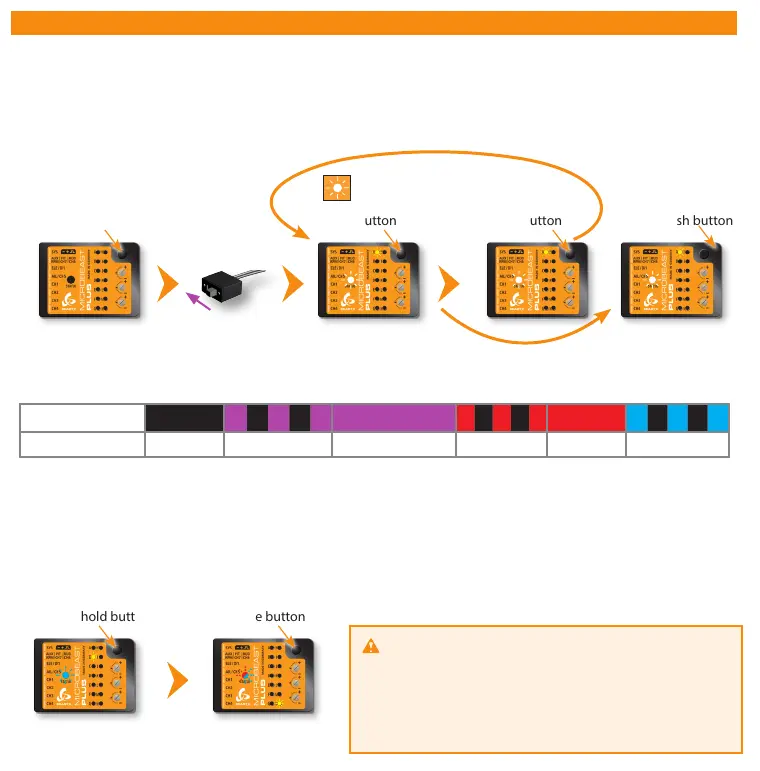
5. RECEIVER SETUP
Switch on power
supply
Menu LED A flashes
Release buttonPress and hold button Briefly push buttonPress and hold button
Skip to Menu LED B
or
End of menu (all LEDs flash)
when choosing „Standard“
Status LED changes color/state
(= changing receiver type)
At menu point A choose which type of receiver/transmission protocol is used. The color and state of the Status LED indicates
which type is currently selected. By repeatedly pressing and holding the button you can switch between the receiver types.
Briefly pushing the button will skip to menu point B or to the menu end in case you selected the „Standard“ type.
Status LED o ashing purple purple ashing red red ashing blue
A Receiver type
Standard JR® RJ01 satellite Spektrum® satellite S-Bus® SRXL® SPPM
Menu LED B flashes
Status LED is solid blue
Single-Line receiver (Status LED not off)
If the correct receiver type has been selected and transmitter and receiver are bound and switched on and if the receiver is
sending a valid signal on the Single-Line output, the Status LED must light up in blue color at menu point B. Again press and
hold the button here to load the default function assignment that has been preset for the selected radio system (see next page).
Alternatively you may program a different function assignment manually in case the default assignment does not work with your
transmitter‘s function layout. How this works in detail you can read from the detailed instruction manual which you can see at
wiki.beastx.com.
Press and hold button Release button
Menu LED N flashes
Status LED flashes red/blue
Warning! At menu point N (Throttle failsafe position)
the throttle output CH5 is activated! Move the throttle to the
desired failsafe position which will be set in case the Single-Line
connection is interupted oder gets disconnected.
Briefly push the button to save all the receiver settings now.
The end of menu is reached which is indicated by all menu LEDs
flashing.
To enter Receiver menu MICROBEAST PLUS must be switched off completely. Push and hold the button before and while
powering on. Menu LED A will start to flash instantly.



 To Next Page