BEC MX-210NP 4G/LTE Broadband Router with PoE
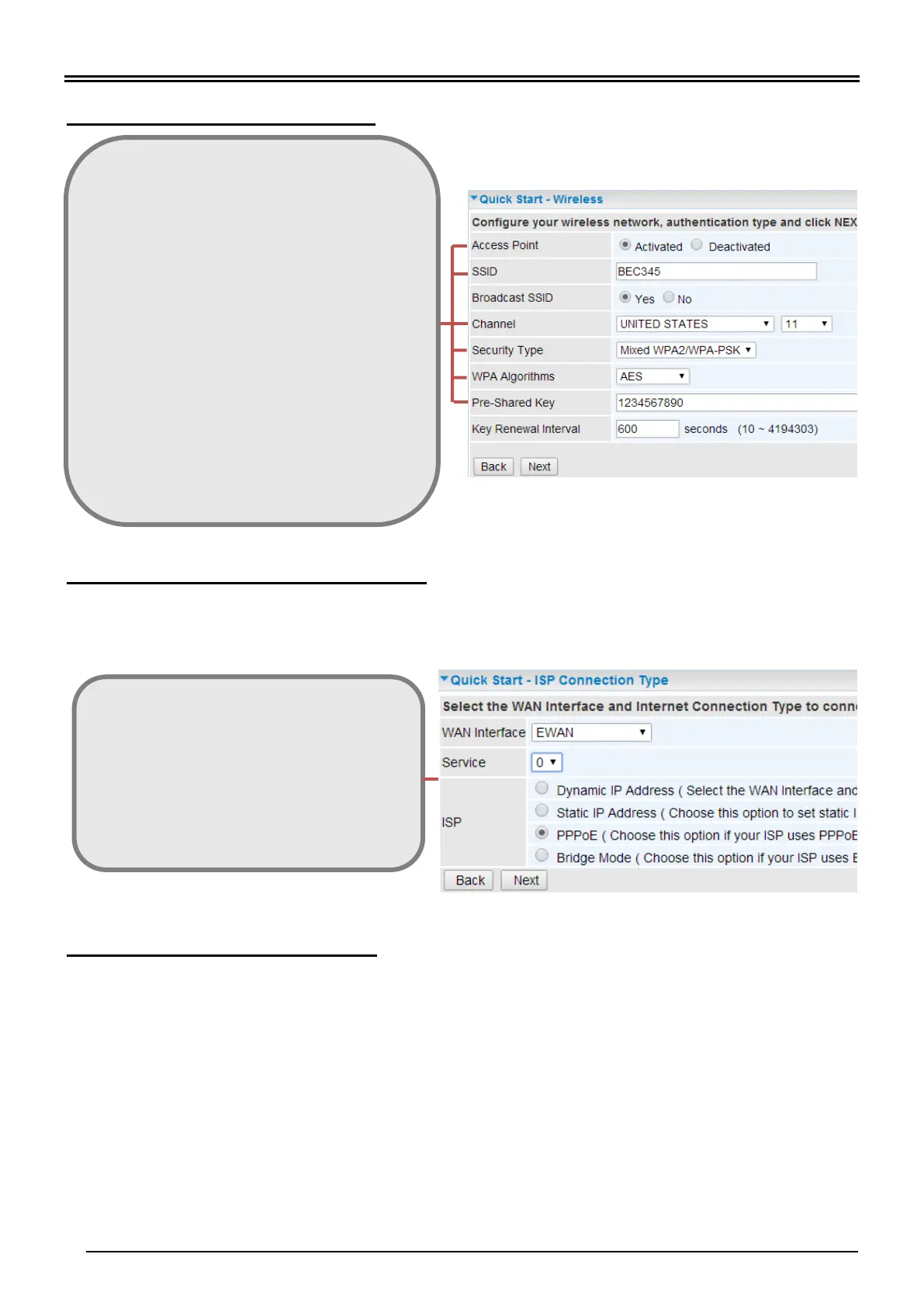
Step 3: Setup Wireless Connection
Step 4: WAN / Internet Connection Setup
Select the appropriate WAN protocol then fill out the information provided by your ISP in all
relevant parameters.
Example: WAN Interface in EWAN mode.
Step 5: Save Confirmation Settings
Click “Next” to save and complete the Quick Setup.
You should now be able to access to the Internet.
Please see the relevant sections of User Manual for detailed information.
Access Point: select Activated
SSID: Assign a unique name
Channel: pick from 1~11
Security Type: select a mode
- Disable (No security)
- WPA
- WPA2 (Most secure one)
- WPA / WPA2 (auto detect WPA mode with wireless
clients)
- WEP (Less secure one)
Pre-Shared Key: key for wireless authentication
- WPA / WAPA2 Share Key: Assign a key between 8
~ 63 characters.
- WEP: select Open System, use default WEP Key 1
then assign 26 Hex codes
Next Step: click Next
Protocol: select one of them
- Dynamic IP Address (Obtain an IP address
automatically)
- Static IP Address (Manually assign an IP)
- PPPoE
- Bridge Mode
Net Step: click Continue



 To Next Page