SETTING
(City selection, EXPERT MODE (LONGITUDE, LATITUDE, TIME ZONE)
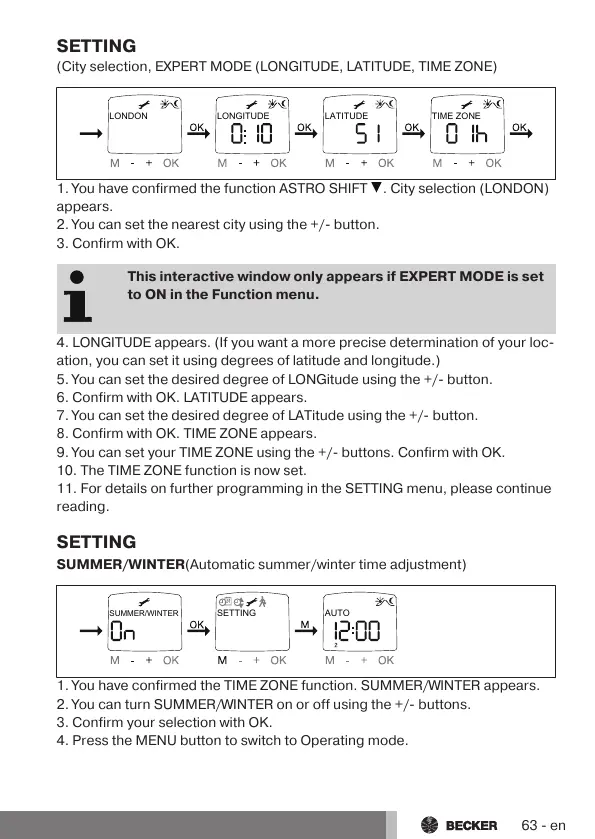
LONDON LONGITUDE LATITUDE TIME ZONE
1. You have confirmed the function ASTRO SHIFT . City selection (LONDON)
appears.
2. You can set the nearest city using the +/- button.
3. Confirm with OK.
This interactive window only appears if EXPERT MODE is set
to ON in the Function menu.
4. LONGITUDE appears. (If you want a more precise determination of your loc-
ation, you can set it using degrees of latitude and longitude.)
5. You can set the desired degree of LONGitude using the +/- button.
6. Confirm with OK. LATITUDE appears.
7. You can set the desired degree of LATitude using the +/- button.
8. Confirm with OK. TIME ZONE appears.
9. You can set your TIME ZONE using the +/- buttons. Confirm with OK.
10. The TIME ZONE function is now set.
11. For details on further programming in the SETTING menu, please continue
reading.
SETTING
SUMMER/WINTER(Automatic summer/winter time adjustment)
1. You have confirmed the TIME ZONE function. SUMMER/WINTER appears.
2. You can turn SUMMER/WINTER on or off using the +/- buttons.
3. Confirm your selection with OK.
4. Press the MENU button to switch to Operating mode.
63-en



 To Next Page