FUNCTION
ROLLER SHUTTER/VENETIAN BLIND, RUNNING TIME, INITIAL OPERA-
TION (Selection of the shading solution, running time of roller shutter/venetian
blind, date of initial operation)
AUTO
EXPERT MODE
FUNCTION ROLLER SHUTTER RUNNING TIME
FUNCTION
INITIAL OPERATION
AUTO
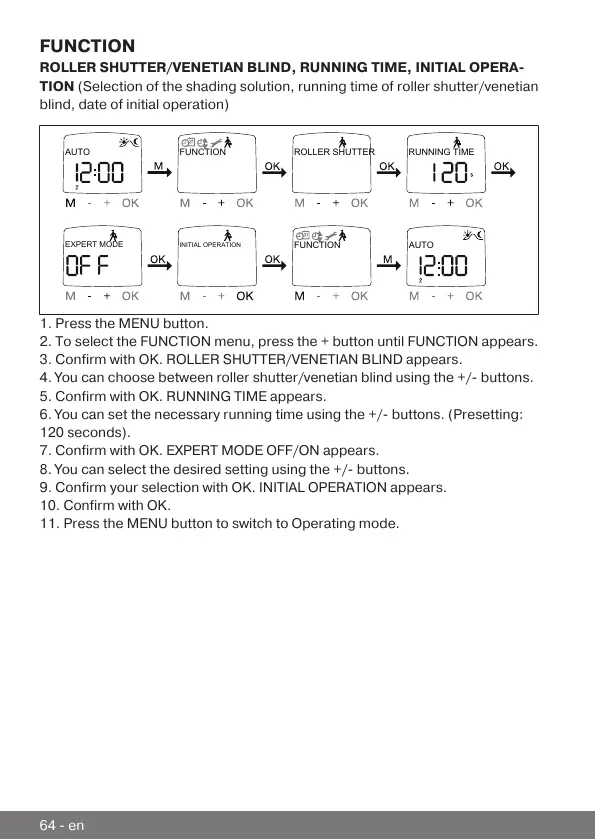
1. Press the MENU button.
2. To select the FUNCTION menu, press the + button until FUNCTION appears.
3. Confirm with OK. ROLLER SHUTTER/VENETIAN BLIND appears.
4. You can choose between roller shutter/venetian blind using the +/- buttons.
5. Confirm with OK. RUNNING TIME appears.
6. You can set the necessary running time using the +/- buttons. (Presetting:
120 seconds).
7. Confirm with OK. EXPERT MODE OFF/ON appears.
8. You can select the desired setting using the +/- buttons.
9. Confirm your selection with OK. INITIAL OPERATION appears.
10. Confirm with OK.
11. Press the MENU button to switch to Operating mode.
64-en



 To Next Page