—07—
BT6500 Bluetooth Instrucons
Step 1: Plug base into power source
Step 2: Turn Bluetooth on in cell phone
Step 3: Install the app
For Android SystemFor IOS System
Step 4: Control device via app.
Step 5: Open control center and select desired options.
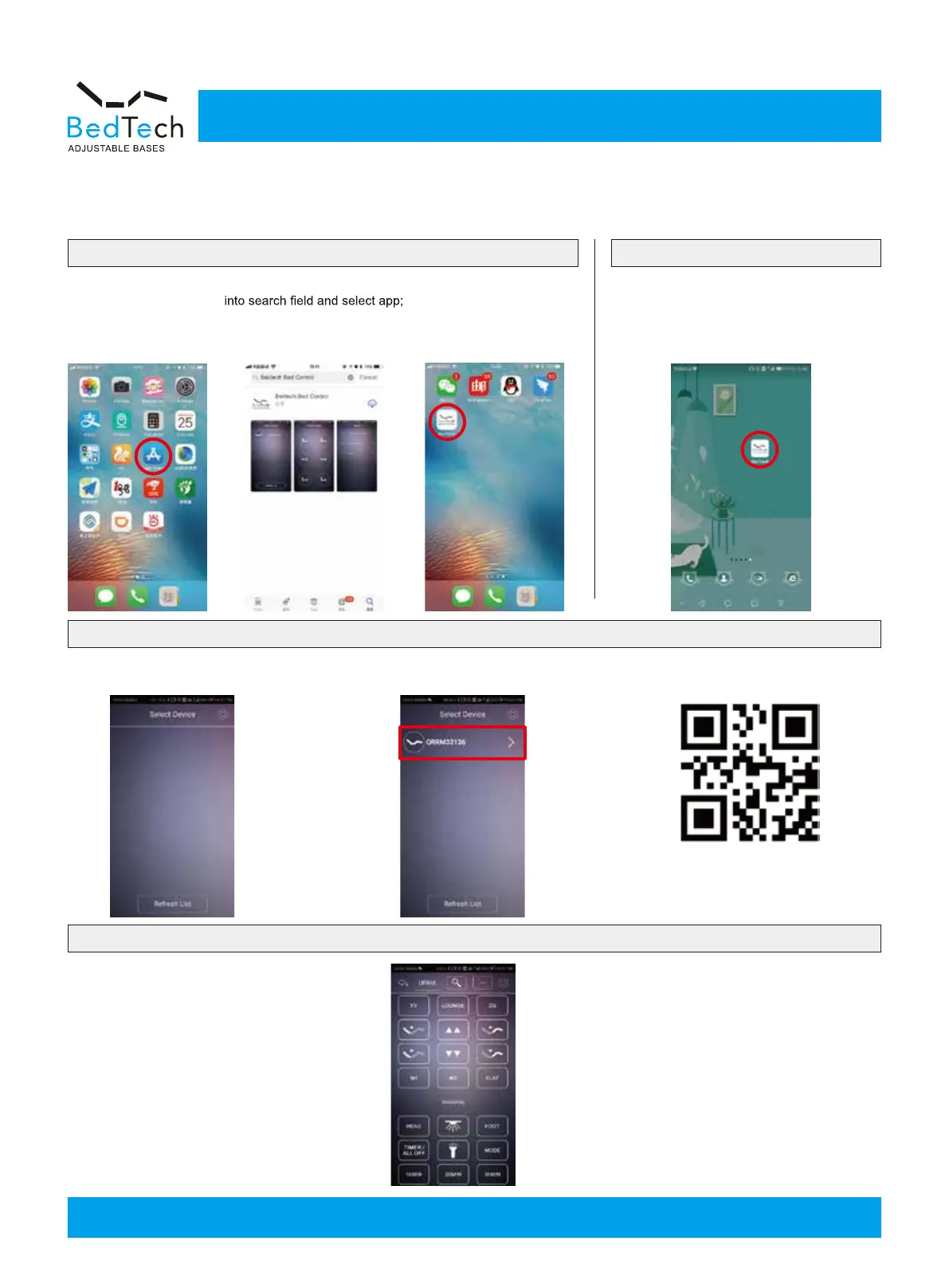
1. Go to app store as
shown in picture below.
1. Open app that was previously installed on
cell phone as shown in picture below.
2. Refresh list and select your device as
shown in picture below.
3.Scan the QR code on the back of remote
after selecting your device.
1.Search "Bedtech bed control" in google store
to install APP.
2.Successful installation shown in picture below.
2.Type “Bedtech bed control”
press “install” to install app onto
cell phone as shown below.
3.Successful installation
shown in picture below.
Customer Service: 888-236-3044



 To Next Page