EasyManua.ls Logo

BEEHIVE SUPER BEE - Page 45

Default Icon
56 pages
Print Icon
To Next Page IconTo Next Page
To Previous Page IconTo Previous Page
Loading...
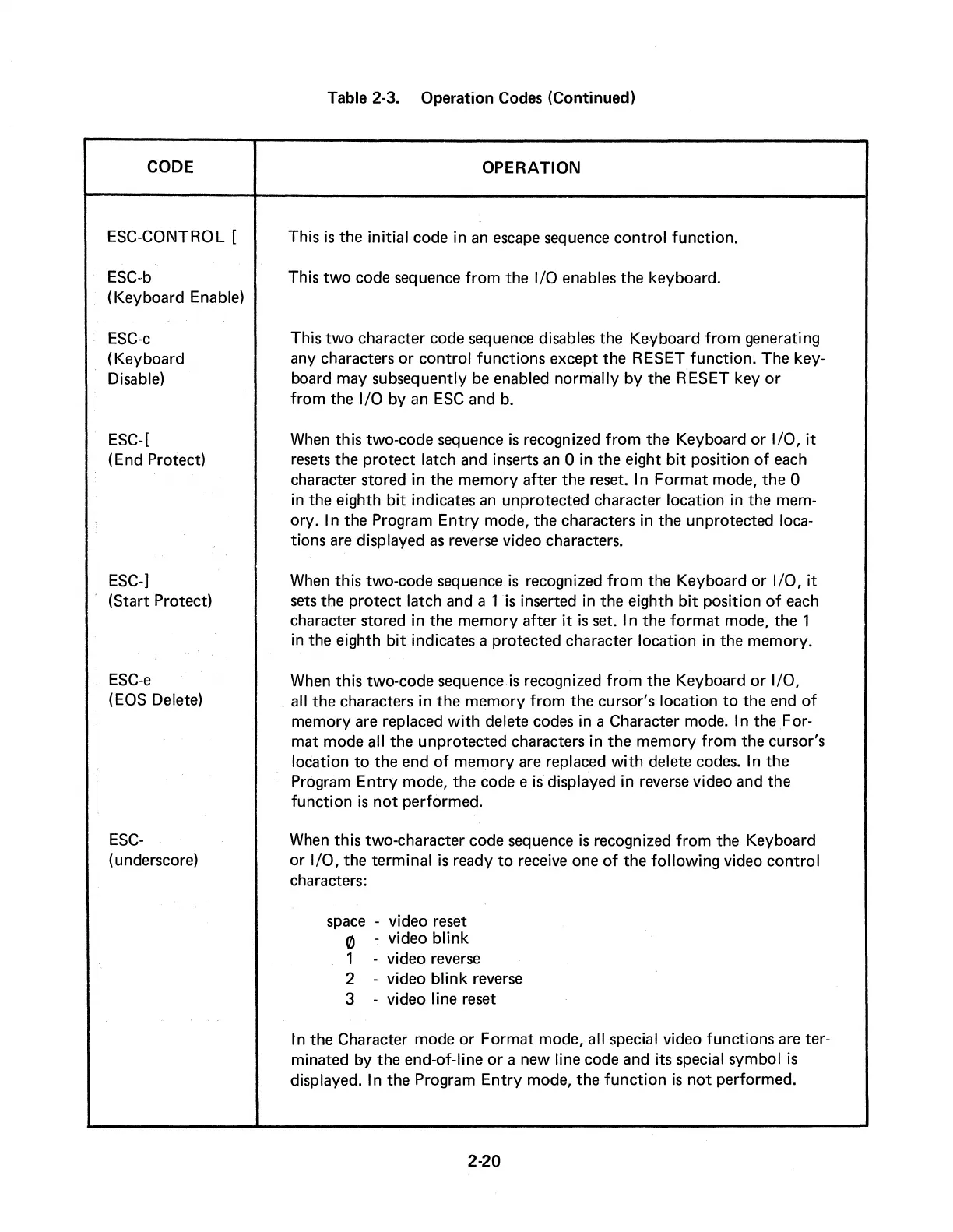
Table 2-3.
Operation
Codes (Continued)
CODE OPERATION
ESC-CONTRO L [
ESC-b
(Keyboard
Enable)
ESC-c
(Keyboard
Disable)
ESC-[
(End Protect)
ESC-]
(Start
Protect)
ESC-e
( EOS Delete)
ESC-
( underscore)
This
is
the
initial
code
in an escape sequence
control
function.
This
two
code
sequence
from
the
1/0 enables
the
keyboard.
This
two
character
code
sequence disables
the
Keyboard
from
generating
any characters
or
control
functions
except
the
RESET
function.
The
key-
board
may
subsequently
be enabled normally
by
the
RESET key
or
from
the
1/0 by
an
ESC
and
b.
When
this
two-code
sequence
is
recognized
from
the
Keyboard
or
1/0, it
resets
the
protect
latch
and
inserts an 0
in
the
eight bit position
of
each
character
stored
in
the
memory
after
the
reset. In
Format
mode,
the
0
in
the
eighth bit indicates an
unprotected
character
location
in
the
mem-
ory. In
the
Program
Entry
mode,
the
characters in
the
unprotected
loca-
tions are displayed as reverse video characters.
When
this
two-code sequence
is
recognized
from
the
Keyboard
or
1/0, it
sets
the
protect
latch and a 1
is
inserted
in
the
eighth bit position
of
each
character
stored
in
the
memory
after
it
is
set. In
the
format
mode,
the
1
in
the
eighth bit indicates a
protected
character
location
in
the
memory.
When
this
two-code
sequence
is
recognized
from
the
Keyboard
or
1/0,
. all
the
characters
in
the
memory
from
the
cursor's
location
to
the
end
of
memory
are replaced with delete codes
in
a Character mode. In
the
For-
mat
mode
all
the
unprotected
characters in
the
memory
from
the
cursor's
location
to
the
end
of
memory
are replaced with delete codes.
In
the
Program
Entry
mode,
the
code
e
is
displayed in reverse video
and
the
function
is
not
performed.
When
this
two-character
code
sequence
is
recognized from
the
Keyboard
or
1/0,
the
terminal
is
ready
to
receive
one
of
the
following video
control
characters:
space - video reset
0 - video blink
1 - video reverse
2 - video blink reverse
3 - video line reset
In
the
Character
mode
or
Format
mode, all special video functions are ter-
minated
by
the
end-of-line
or
a new line
code
and
its special symbol
is
displayed.
In
the
Program
Entry
mode,
the
function
is
not
performed.
2-20