• For more precise m easurements (e.g. for characteristics) the supply voltage of the
lamps must be measured and monitored, as voltage fluctuations falsify the mea-
surement result. For measuring luminescent lamps additionally measure the am-
bient temperature as the light current of a luminescent lamp strongly depends on
the ambient temperature.
• Switch off the HOLD-Function
• Only remove the measurement cell cover immediately before commencing the
measurement and replace immediately after termination of measurement.
• When carrying out a horizontal lighting intensity measurement hold the measure-
ment in a horizontal position in front of the body to ensure that the diffuser wind-
ow of the measurement cell is pointing to the ceiling. The distance between the
floor and the m easurem ent cell am ounts t o 0 .85 m for no rm al inside m easur em ent s
and to 0.2m for traffic route measurements in buildings.
• During measurement, make sure that the height of measurement points and the
sensor sensitivity position comply with the requirements.
• During the measurement, the incidence onto the measurement sensor must not
be deflected by the person carrying out the measurement or other objects (scree-
ning, reflections...).
• Due to the fact that lum inous intensity and operating time have an influence on the
sensor, a regular instrument adjustment is advantageous to maintain continuous
measurement accuracy.
5.3 Carrying out Measurements
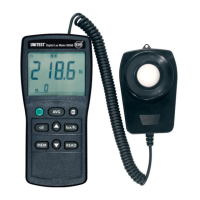
• Switch on instrument.
If the unit “ cd“ is displayed on the screen, change to lum inous intensity m ea-
surement using the “ cd“ key (5). After the change-over, the unit “Ix“ is dis-
played on the screen.
• Press “ lux/fc ” key select the desired lux or fc unit.
• Remove the photo detector cap and face detector to the light source in a ho-
rizontal position.
• Read the illuminance value from the LCD display.
• Press the “ H” key, if the displayed value needs to be hold.
Press ”H” key again to exit the data hold mode.
9


 To Next Page