14 /36 EN
Refrigerator / User Guide
4 Installation
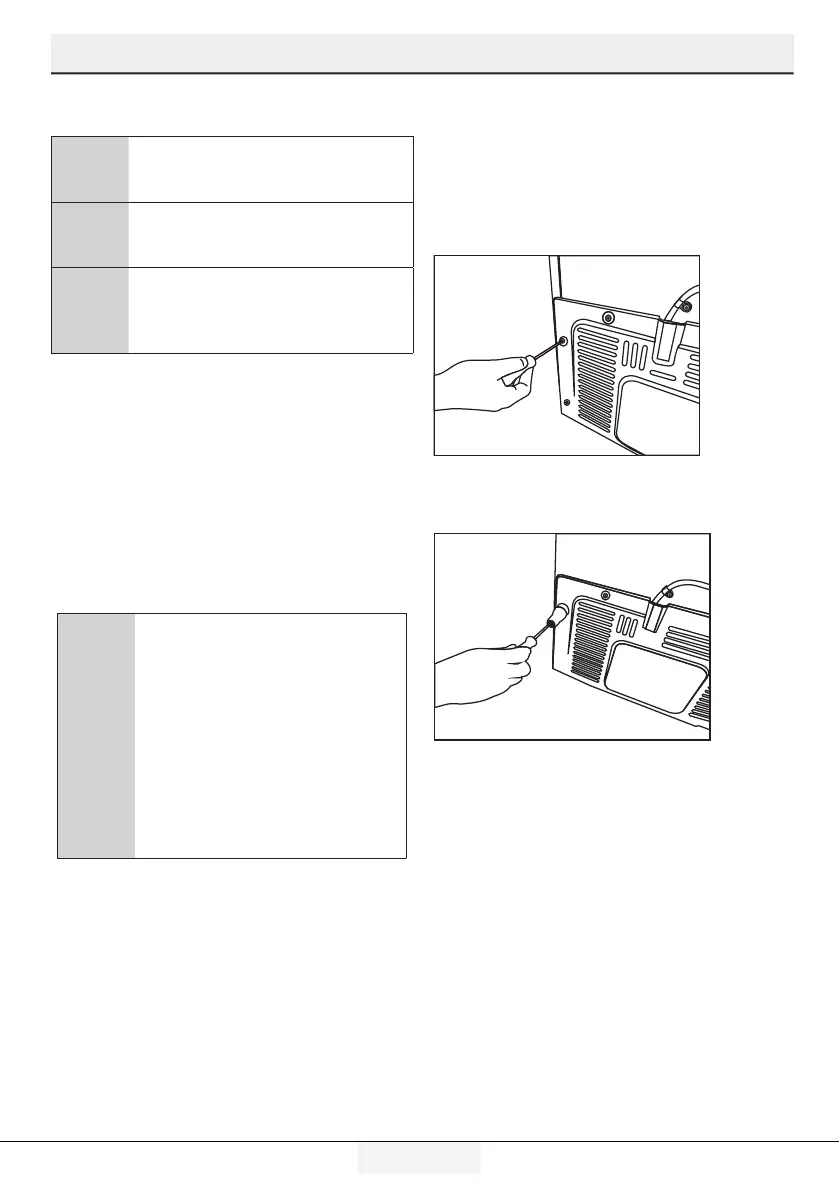
4.4 Attaching the plastic wedges
Use the plastic wedges in the provided with
the product to provide sufficient space for air
circulation between the product and the wall.
1. To attach the wedges, remove the
screws on the product and use the screws
provided with the wedges.
2. Attach 2 plastic wedges on the
ventilation cover shown as j in the figure.
4.3 Power connection
A
WARNING:Do not use extension
or multi sockets in power
connection.
B
WARNING: Damaged power
cable must be replaced by
Authorzed Servce.
C
When placng two coolers n
adjacent poston, leave at least
4 cm dstance between the two
unts.
• Our frm wll not assume
responsblty for any damages
due to usage wthout earthng and
power connecton n complance wth
natonal regulatons.
• The power cable plug must be easly
accessble after nstallaton.
• Do not use mult-group plug wth or
wthout extenson cable between the
wall socket and the refrgerator.
C
Hot Surface Warnng!
Sde walls of your product s
equpped wth refrgerant
ppes to mprove the coolng
system. Refrgerant wth hgh
temperatures may flow through
these areas, resultng n hot
surfaces on the sde walls. Ths
s normal and does not need any
servcng. Please pay attenton
whle touchng these areas.


 To Next Page