EasyManua.ls Logo

Beko DVC665 - Operating the Hob; Hob Control Knobs and Indicators

Beko DVC665
13 pages
Print Icon
To Next Page IconTo Next Page
To Previous Page IconTo Previous Page
Loading...
operating
the
hob
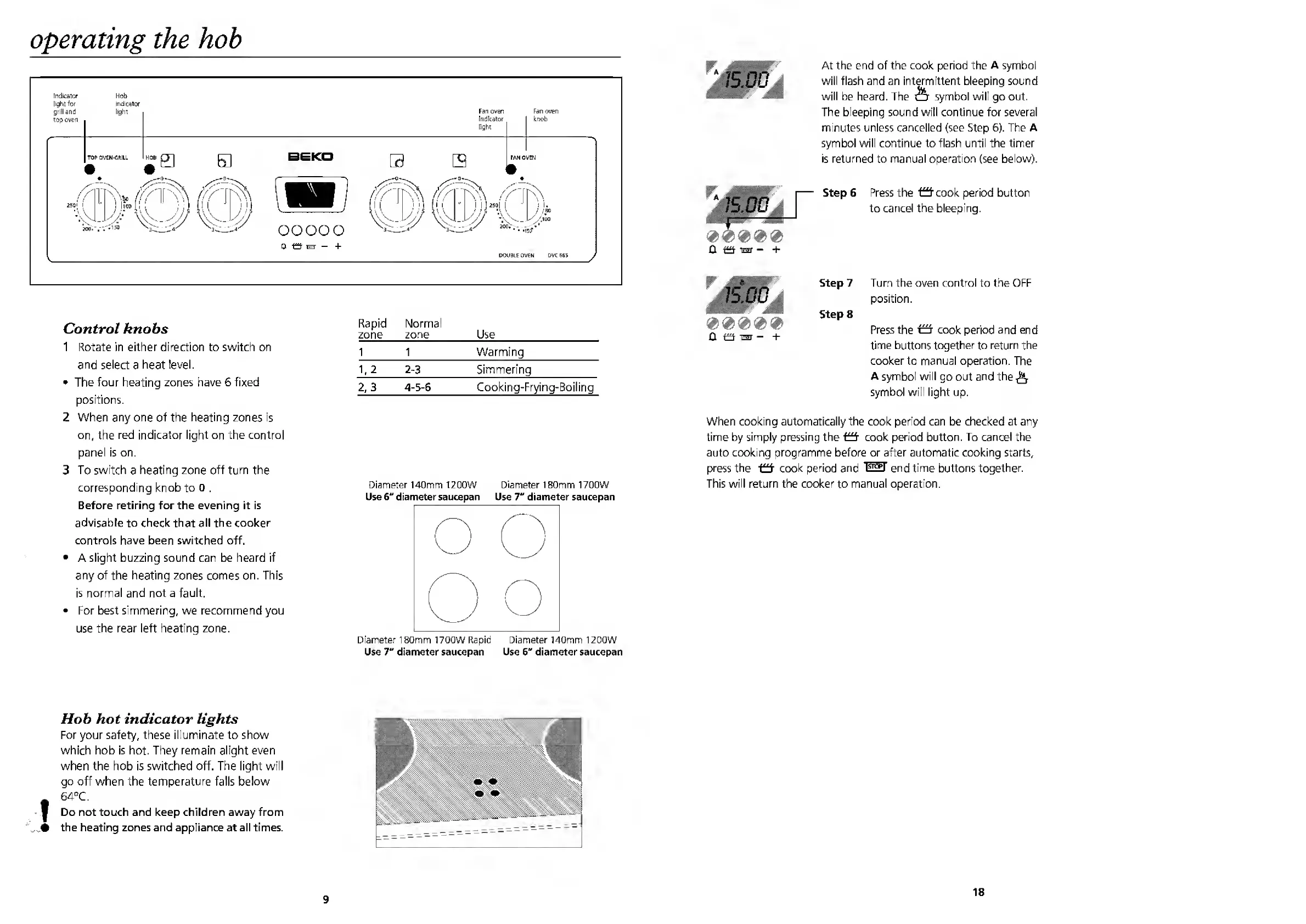
Control
knobs
1
Rotate
in
either
direction
to
switch
on
and
select
a
heat
level.
The
four
heating
zones
have
6
fixed
positions.
2
When
any
one
of
the
heating
zones
is
on,
the
red
indicator
light
on
the
control
panel
is
on.
3
To
switch
a
heating
zone
off
turn
the
corresponding
knob
to
o
.
Before
retiring
for
the
evening
it
is
advisable
to
check
that
all
the
cooker
controls
have
been
switched
off.
A
slight
buzzing
sound
can
be
heard
if
any
of
the
heating
zones
comes
on.
This
is
normal
and
not
a
fault.
For
best
simmering,
we
recommend
you
use
the
rear
left
heating
zone.
Rapid
zone
Normal
zone
Use
1
1
Warming
1,2
2-3
Simmering
2,3
4-5-6
Cooking-Frying-Boiling
Diameter
140mm
1200W
Diameter
180mm
1700W
Use
6"
diameter
saucepan
Use
7"
diameter
saucepan
Diameter
180mm
1700W
Rapid
Diameter
140mm
1200W
Use
7"
diameter
saucepan
Use
6"
diameter
saucepan
Hob
hot
indicator
lights
For
your
safety,
these
illuminate
to
show
which
hob
is
hot.
They
remain
alight
even
when
the
hob
is
switched
off.
The
light
will
go
off
when
the
temperature
falls
below
64°C.
Do
not
touch
and
keep
children
away
from
the
heating
zones
and
appliance
at
all
times.
9
At
the
end
of
the
cook
period
the
A
symbol
will
flash
and
an
intermittent
bleeping
sound
will
be
heard.
The
&
symbol
will
go
out.
The
bleeping
sound
will
continue
for
several
minutes
unless
cancelled
(see
Step
6).
The
A
symbol
will
continue
to
flash
until
the
timer
is
returned
to
manual
operation
(see
below).
Press
the
Ocook
period
button
to
cancel
the
bleeping.
Step
7
Turn
the
oven
control
to
the
OFF
position.
Step
8
Press
the
fffj
cook
period
and
end
time
buttons
together
to
return
the
cooker
to
manual
operation.
The
A
symbol
will
go
out
and
the^
symbol
will
light
up.
When
cooking
automatically
the
cook
period
can
be
checked
at
any
time
by
simply
pressing
the
cook
period
button.
To
cancel
the
auto
cooking
programme
before
or
after
automatic
cooking
starts,
press
the
O
cook
period
and
l^T
end
time
buttons
together.
This
will
return
the
cooker
to
manual
operation.
0000
®
0
izj
HET
+
18

Other manuals for Beko DVC665

Related product manuals