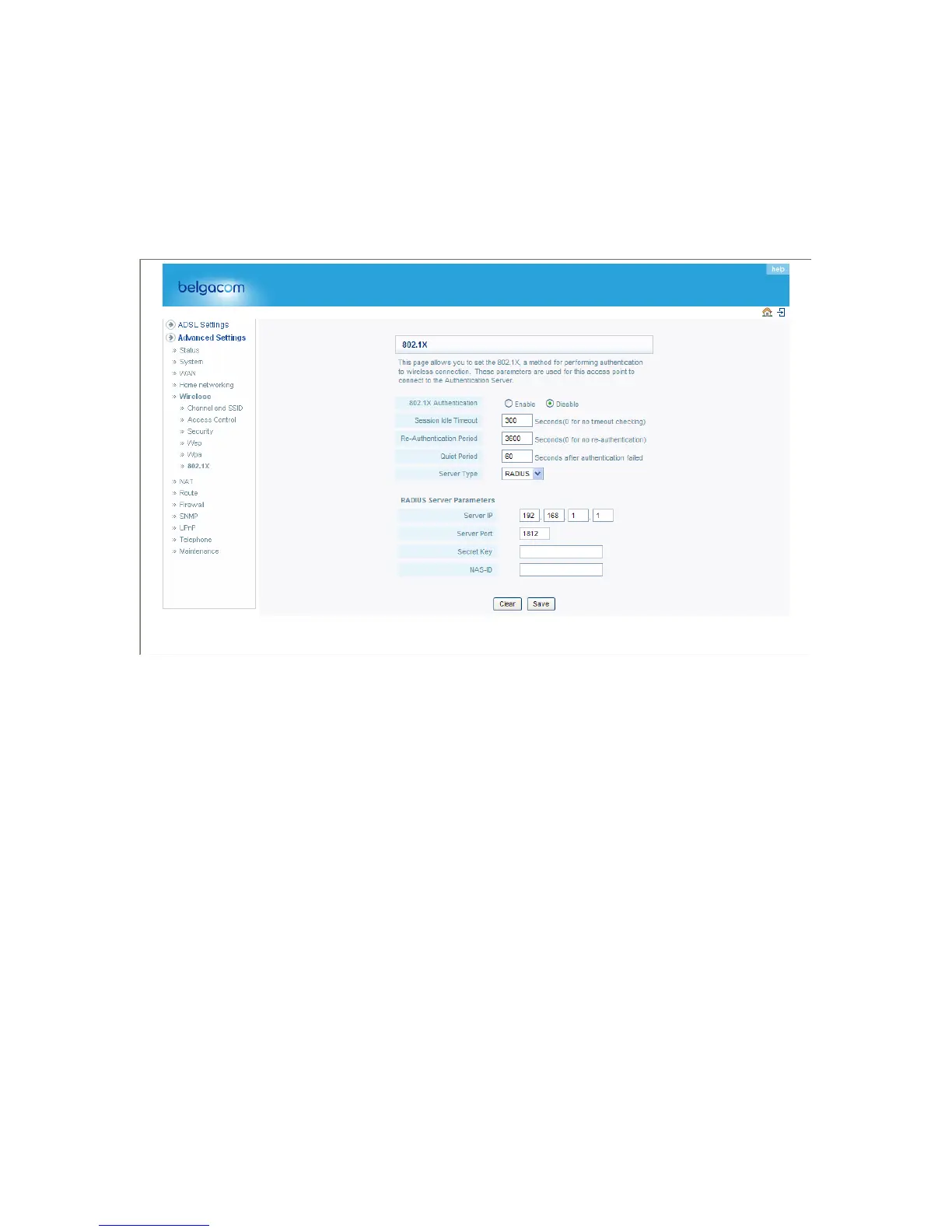
802.1X
Management access will be checked against the authentication database stored on the
router. If an authentication RADIUS server is used, you must specify the secret key of the
Message-Authenticator attribute, i.e., Message Digest-5 (MD5), and the corresponding
parameters in the RADIUS Server Parameters field for the remote authentication protocol.
See the description of the 802.1x features below.
• General Parameters
Field Default Parameter Description
Enable 802.1X Yes Session Idle 300 seconds Timeout
Re-Authentication 3600 seconds Period
Quiet Period 60 seconds
Server Type RADIUS Starts using 802.1x security control.
Defines a maximum period of time for which the connection is maintained during inactivity.
Defines a maximum period of time for which the RADIUS server will dynamically re-assign a
session key to a connected client station.
Defines a maximum period of time for which the router will wait between failed authentications.
Selects the authentication server type.
• RADIUS Server Parameters
Field Default Description Parameter
Server IP 192.168.1.1 The IP address of the RADIUS server.
45


 To Next Page