6/16 - Subject to change. © Belimo Aircontrols
USA
, Inc
uick
etu
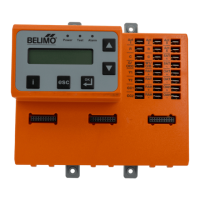
Required "Settings" Parameters for All Confi gurations
1. ZIP Code US or Canada (sets the free cooling changeover high limit and
temperature units F/C)
a. When the Zip Code submenu is displayed enter “OK” to begin “US” Zip
Code parameterization. If “Canada” Postal Code is desired press the up
own arrow to access.
i. Press OK to access digit 1 (fl ashing) then use the up/down arrow
to parameterize; enter OK when complete. Repeat until all digits
are com
lete. If a mistake is made
ress “esc” and re
eat from
eg
nn
n
ii. When all Zip Code or Postal Code digits are entered press
“esc” to move up a level then press the up
down arrow to access
next settings parameter.
2. Vent Min Pos (
utdoor Air Damper Ventilation Minimum Position)
a. When the “Vent Min Pos” submenu is displayed press “OK” to
parameterize (
ashing).
b. Use the u
down arrow to
arameterize,
ress “
K” when com
lete.
e actuator w
mme
ate
y
r
ve t
e
amper to t
e m
n
mum pos
t
on.
3. Additional Parameters may require setting. The ZIP Economizer will auto
t
t
D
vi
h
2
n
r
t
. Wh
n th
ZIP E
n
miz
r
detects a new device, it will prompt the user in the
tatus level; navigate to
ettings and parameterize blank fi elds. If the devices are connected upon
fi rst start up their settings will require parameterization then.
. When all parameters have been set, the ZIP Economizer will show “
etup
Com
lete” if there are still
arameters to set, there will be no action. You
can veri
y by pushing esc until status level is reached and it will display
“Setup Incomplete”. If this is the case, re-enter settings menu and use up
down arrows to
nd the parameter with blank
elds and parameterize as
ri
v
.
N
te: you may enter parameters in any order - eg: Vent min Pos before
ZIP Code - If the RTU is a heat
um
or uses a 2 s
eed indoor fan, these
paramaters should be enabled fi rst, otherwise the logic may go to Setup
omplete prematurely.
Service and Commissioning (Acceptance Test & Manual Mode)
Setup Complete - Initializing Automatic Mode
The ZIP Economizer has built in commissioning processes found in
cce
tance Test.
.
c
n
mizer Test. Use “Economizer Test” to verify RTU Integrated
Economizer operation. Navigate to the “Service and Commissioning” menu,
ress “OK”;
ress the down arrow to access “Acce
tance Test”. Press
K again when “Economizer Test” appears. Press “OK” again to confi rm
unn
ng test.
o
ow prompts
ur
ng test.
s test w
open
amper
to 100%, enable power exhaust fan (if connected), enable 1st stage of
echanical
ooling, reverse this process and then drive to Vent Min
Position. When used with a Belimo actuator, the actuator will s
eed u
to
e
uce test t
me.
.
anua
e is used to override outputs after entering a “Timeout”
uration.
.
amper
caling.
e test w
re-sca
e t
e contro
s
gna
range to
ax
mum reso
ut
on
0-100%
over t
e ca
rate
re
uce
ang
e.
en
sing a Belimo actuator, the actuator will speed up to reduce test time
te: Failure to identi
y obstructions or improper setup o
damper assembly
ay result in an improper scaling and operation o
the damper.
t
:
dditional testin
can be found on pa
e 36 of this document.
1.
en a
entr
es
ave
een com
ete
, t
e
conom
zer w
sw
tc
to
Status dis
la
and show “Setu
Com
lete”, and will immediatel
show a
amper sca
ng starts
n 10secs
an
w
count
own to 0
e aware,
at 0 the damper w
ll start to move at h
gh speed
.
message w
scroll saying “Damper scaling
or better operation i
obstruction is present
resca
e
amper
n comm
ss
on
n
menu
.
or
eta
e
nstruct
ons on
this – please see the section “Service and Commissionin
” below. This will
open damper to 100%
re-scale control si
nal i
needed
.
Note:
ailure to
identi
y obstructions or improper setup o
damper assembly may result in
an improper scaling and operation o
the damper.)
nce scaling is complete, a message will appear saying “Damper scaling
successful”. The ZIP will then show “maximum at 80° = 100%” That
essage will show maximum rotation o
the damper. This process ensures
the damper is always operatin
and displayed from 0-100%.
. Once the message has appeared, the actuator immediately closes the
amper and a countdown begins, until the unit starts to operate in
utomat
c
o
e
e aware, w
en count
own comp
ete, t
e
will respond to thermostat calls which may enable mechanical
oolin
.


 To Next Page
 Loading...