6/16 - Subject to change. © Belimo Aircontrols
USA
, Inc
n
m
z
Service and Commissionin
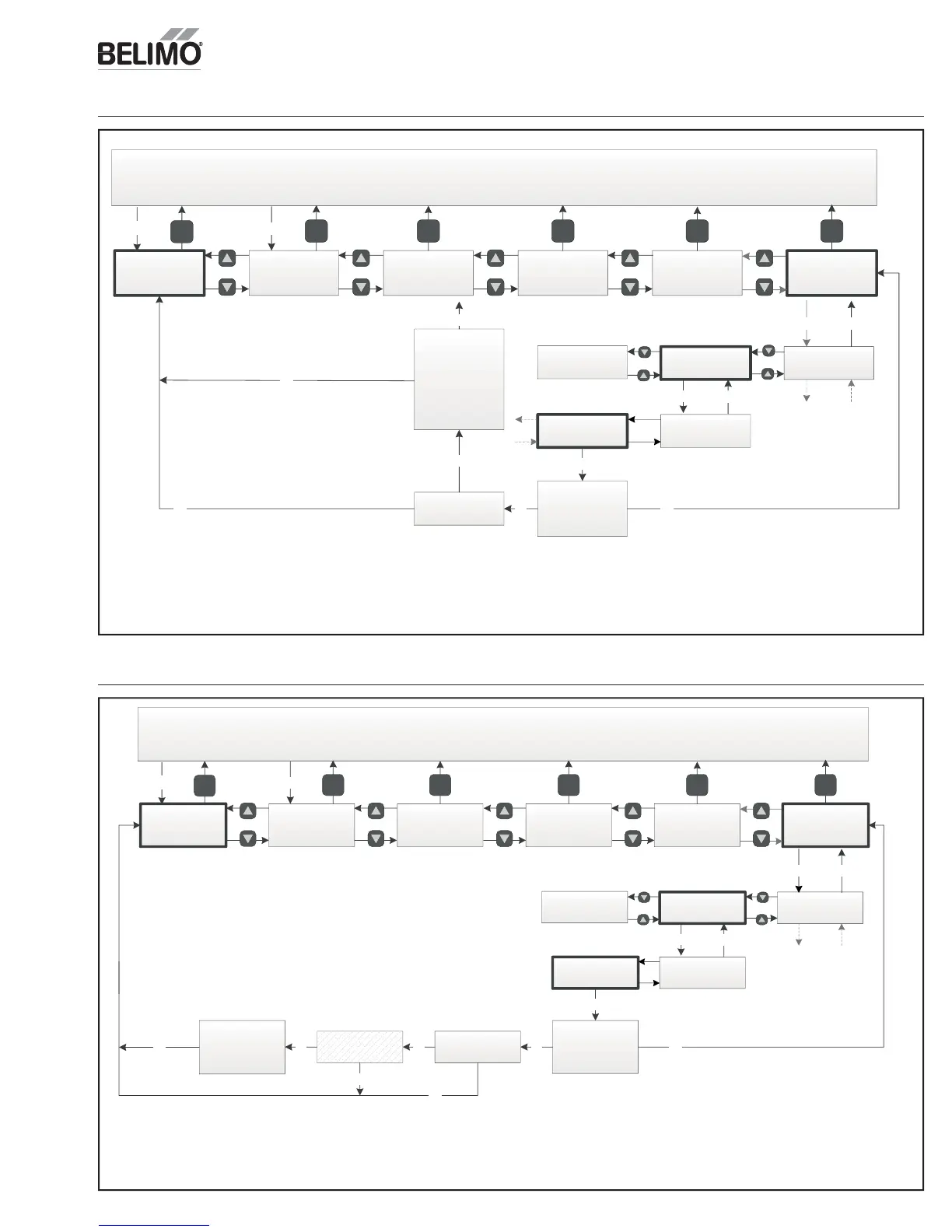
Manual Mode
Acceptance Test
Push ok to run
RTU Test
Push esc to run
return to auto
OK
Push ok disable
DCV
(3)
Push ok disable
Economizer
OKOKOK
You may now
Perform RTU Test
Push esc to
return to auto
RTU Test
esc
OK
esc
esc
esc
esc
(1)
Only displayed if acceptance test or manual mode is active.
If not present navigation jumps over this entry. Must press OK
to return to automatic.
(2)
Only displayed after setup has been completed.
(3)
Only displayed if device is connected and functioning.
escOK
Up/Down arrow
past other tests
4321
Status line
“Acceptance Test”
Monitor Live
Conditions
Settings Present Devices Alarm
esc
esc
esc
esc
Any key
esc
Service and
Commissioning
(2)
esc esc esc escesc
Return to
Automatic
(1)
esc
Any key
(1)
esc
Damper Scaling
Manual Mode
Acceptance Test
Up/Down arrow
past other tests
Push ok to run
Ventilation Test
Push esc to run
return to auto
OK
(1)
Only displayed if acceptance test or manual mode is active.
If not present navigation jumps over this entry. Must press OK
to return to automatic.
(2)
Only displayed after setup has been completed.
(3)
Only displayed if device is connected and functioning.
Push ok disable
Economizer
OK
You may use the
Settings menu &
Monitor menu to
set & verify
Ventilation rate
push ok to go to
menus esc to
quit
Ventilation Test
esc
OK
OK
esc
esc
OK
escOK
esc
4321
Status line
“Acceptance Test”
Monitor Live
Conditions
Settings Present Devices Alarm
esc
esc
esc
esc
Any key
esc
Service and
Commissioning
(2)
esc esc esc escesc
Return to
Automatic
(1)
esc
Any key
(1)
esc
Damper Scaling
ent
at
on
es
RTU Test


 To Next Page