Using the Belkin Wireless Client Utility
15
section
1
2
3
4
5
6
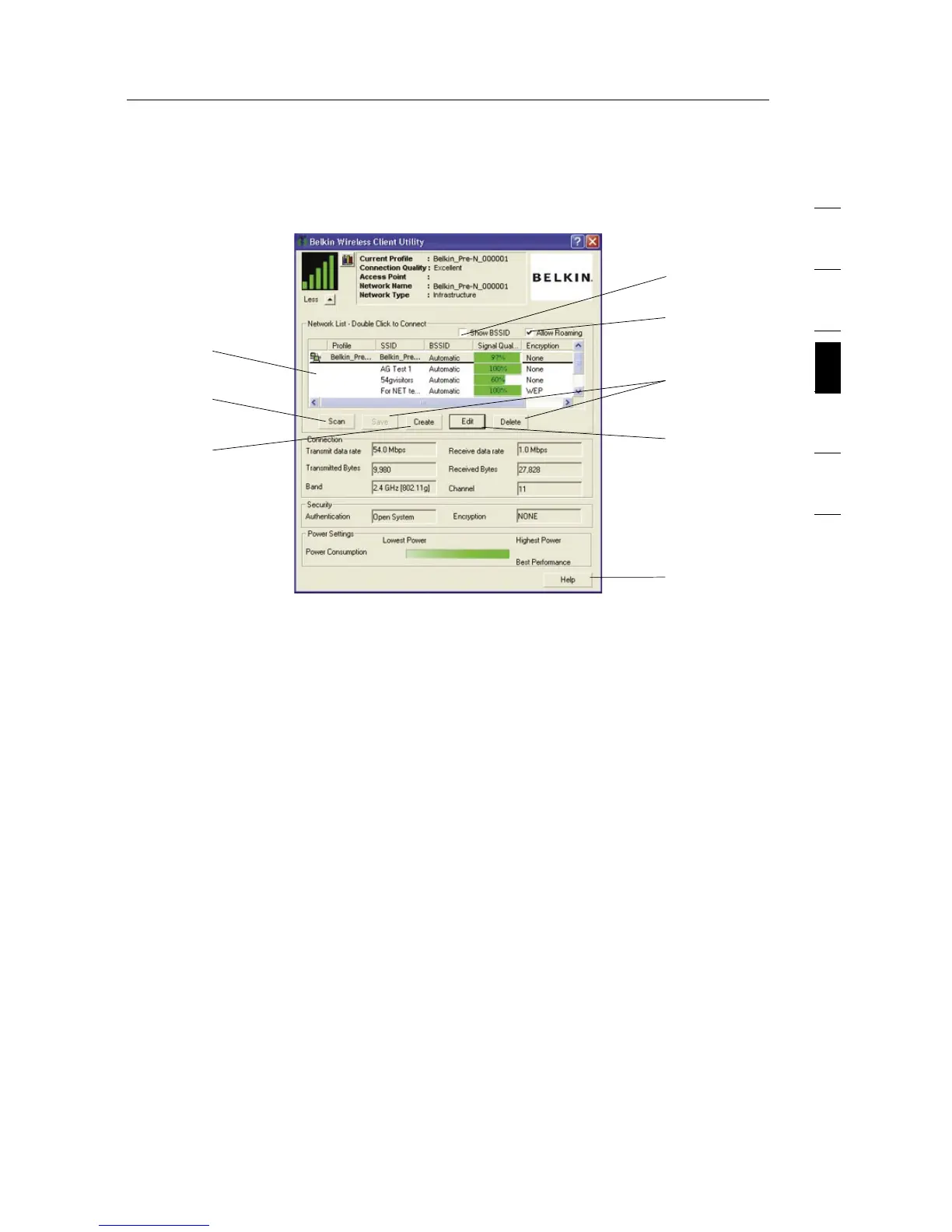
Using the Expanded View
(a) Network List
List all available networks; double-click on a network to connect.
(b) Show BSSID
Select this check box if you wish to see the MAC address of the
access point or router.
(c) Allow Roaming
Select this check box to move from one network to another without
changing the active network selection.
(d) Scan
Click this button to scan the available networks in your area.
(e) Create
You may create a new profile using this button.
(f, g) Save, Delete
You may save and delete networks from the Network List by using
these buttons.
(h) Edit
To edit a saved profile, use this button.
(i) Help
Click this button to link to the help files for assistance using this
Utility or any of the features.
(
b
)
(
a
)
(
c
)
(
f, g
)
(
d
)
(
e
)
(
h
)
(
i
)


 To Next Page