Monitoring the Status of your Network Connection
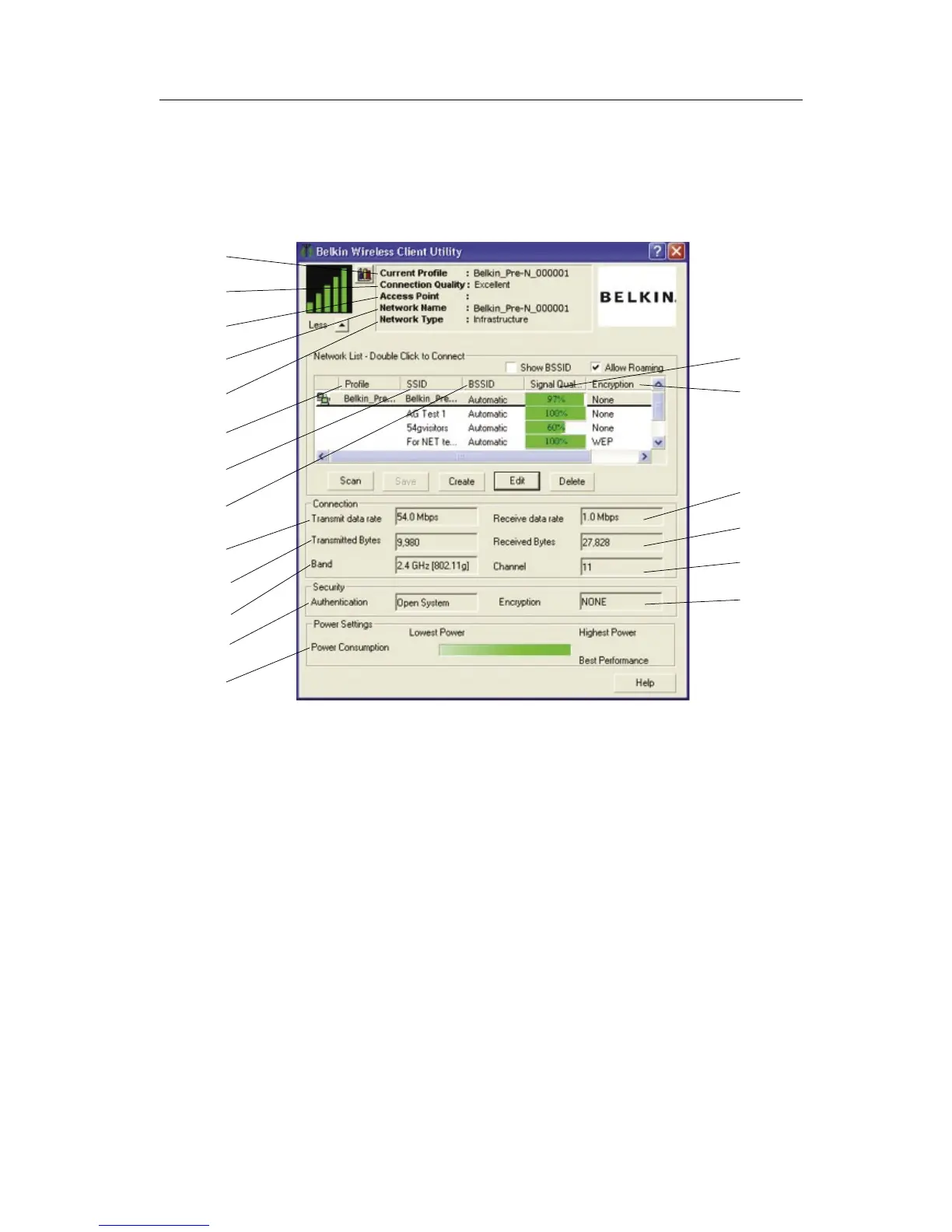
(a) Current Profile
This is the current profile you are using.
(b) Connection Quality
Depending on the distance or noise in your area, the quality you receive
may be excellent, good, or bad.
(c) Access Point
The MAC address of the access point.
(d) Network Name
This is the current network SSID to which you are connected.
(e) Network Type
Will display either “Infrastructure” if connected to a router or an access
point, or “Ad-Hoc” when connected to another computer.
(f) Profile
This column shows if the network has been saved as a profile.
(
a
)
(
b
)
(
c
)
(
j
)
(
l
)
(
r
)
(
i
)
(
d
)
(
e
)
(
f
)
(
g
)
(
h
)
(
k
)
(
m
)
(
q
)
(
s
)
(
n
)
(
o
)
(
p
)


 To Next Page