Using the Web-Based Advanced User Interface
27
1
2
3
4
5
6
7
section
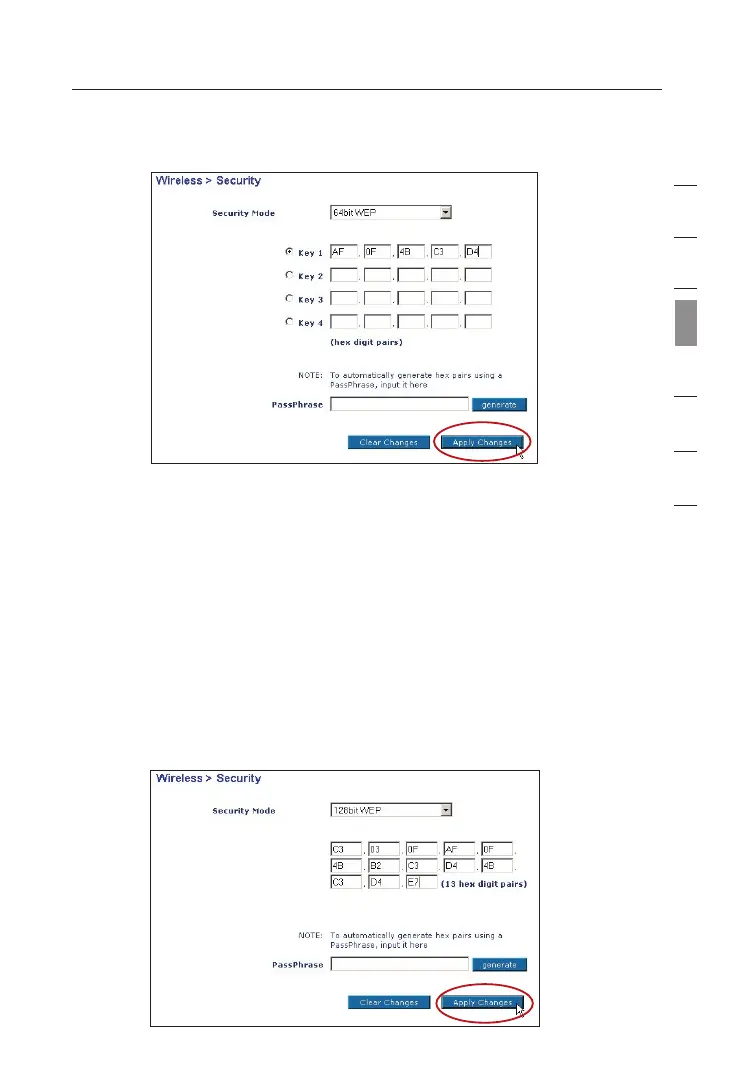
Using a Hexadecimal Key
A hexadecimal key is a combination of numbers and letters from A–F
and 0–9. 64-bit keys are five two-digit numbers. 128-bit keys are 13
two-digit numbers.
For instance: AF 0F 4B C3 D4 = 64-bit key; C3 03 0F AF 0F 4B B2
C3 D4 4B C3 D4 E7 = 128-bit key
In the boxes below, create your key by writing in two characters
between A–F and 0–9 in each box. You will use this key to program
the encryption settings on your WURE and your wireless computers.


 To Next Page