Using the Web-Based Advanced User Interface
33
1
2
3
4
5
6
7
section
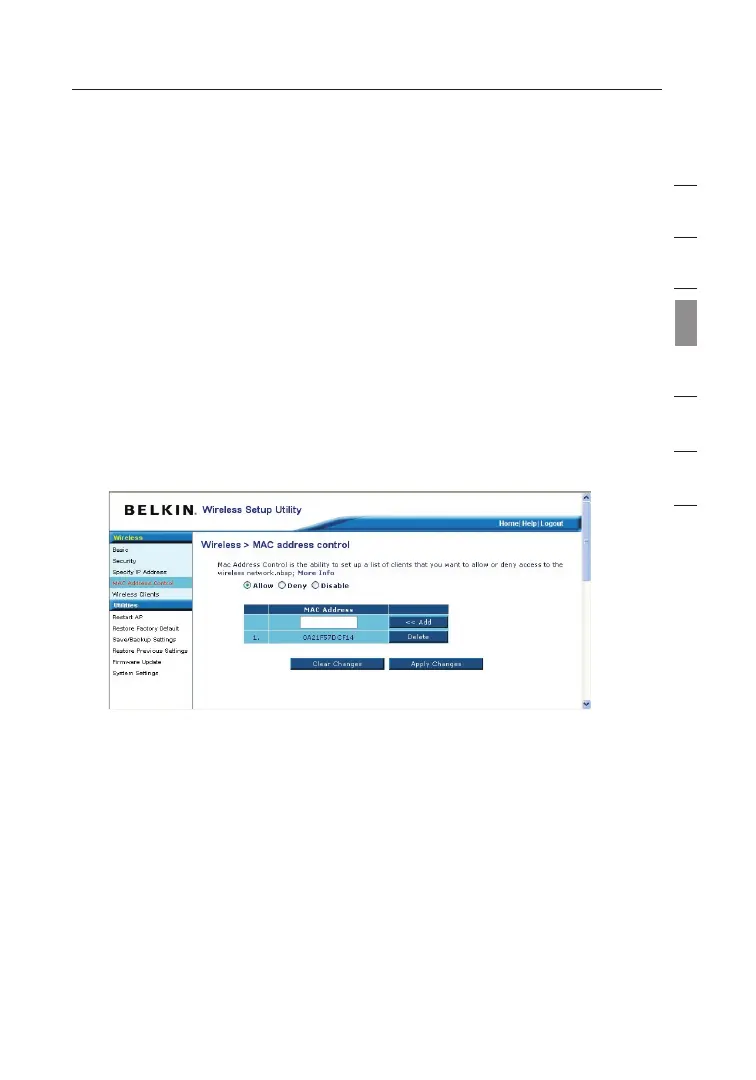
MAC Address Control
Setting MAC Address Filtering
The MAC address filter is a powerful security feature that allows
you to specify which computers are allowed or denied access to the
network. When setting an “Allow” list, any computer NOT included in
the list will be denied access to the network. When setting a “Deny”
list, any computer THAT IS included in the list will be denied access
and all others will be allowed access.
To Enable an “Allow” List
1.
Click the “Allow” radio button (1).
2. Enter the MAC addresses of all computers that you want to allow
access to the network. When finished, click “Apply Changes”.
To Enable a Deny List
1.
Click the “Deny” radio button (2).
2. Enter the MAC address of the computers that you want to deny
access to the network. When finished, click “Apply Changes”.


 To Next Page