2928
Using the Web-Based Advanced User Interface
2928
Using the Web-Based Advanced User Interface
Note to Mac
®
users: Original Apple
®
AirPort
®
products support 64-
bit encryption only. Apple AirPort 2 products can support 64-bit or
128-bit encryption. Please verify which version you are using. If you
cannot configure your network with 128-bit encryption, try 64-bit
encryption.
WEP Setup
64-Bit WEP Encryption
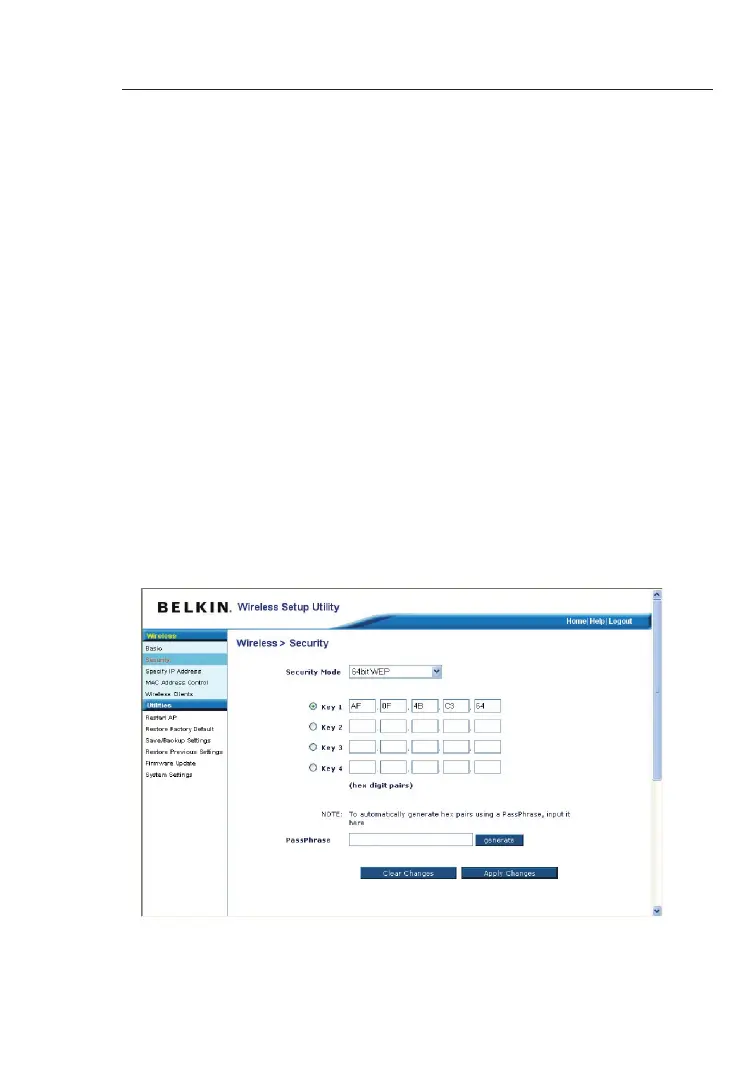
1. Select “64-bit WEP” from the drop-down menu.
2. After selecting your WEP encryption mode, you can enter your
key by typing in the hex key manually, or you can type in a
passphrase in the “Passphrase” field and click “Generate”
to create a key. A hex (hexadecimal) key is a combination of
numbers and letters from A–F and 0–9. For 64-bit WEP, you need
to enter 10 hex characters.
For instance:
AF 0F 4B C3 D4 = 64-bit WEP key


 To Next Page