3332
Using the Web-Based Advanced User Interface
3332
Using the Web-Based Advanced User Interface
Setting WPA2-Personal (AES)
1.
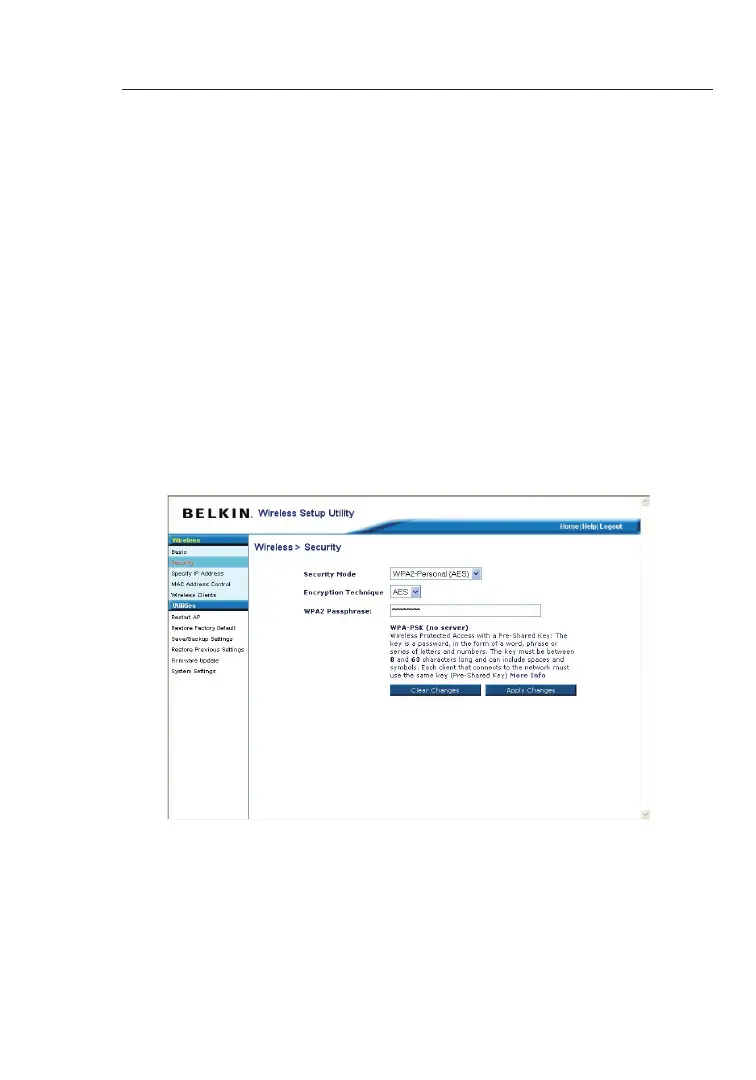
From the “Security Mode” drop-down menu, select
“WPA2-Personal (AES)”.
2. For “Encryption Technique”, select “AES”. This setting will have
to be identical on the clients that you set up.
3. Enter your pre-shared key. This can be from eight to 63
characters and can be letters, numbers, or symbols. This
same key must be used on all of the clients that you set up.
For example, your AES might be something like: “Smith family
network key”.
4. Click “Apply Changes” to finish. You must now set all clients to
match these settings.


 To Next Page