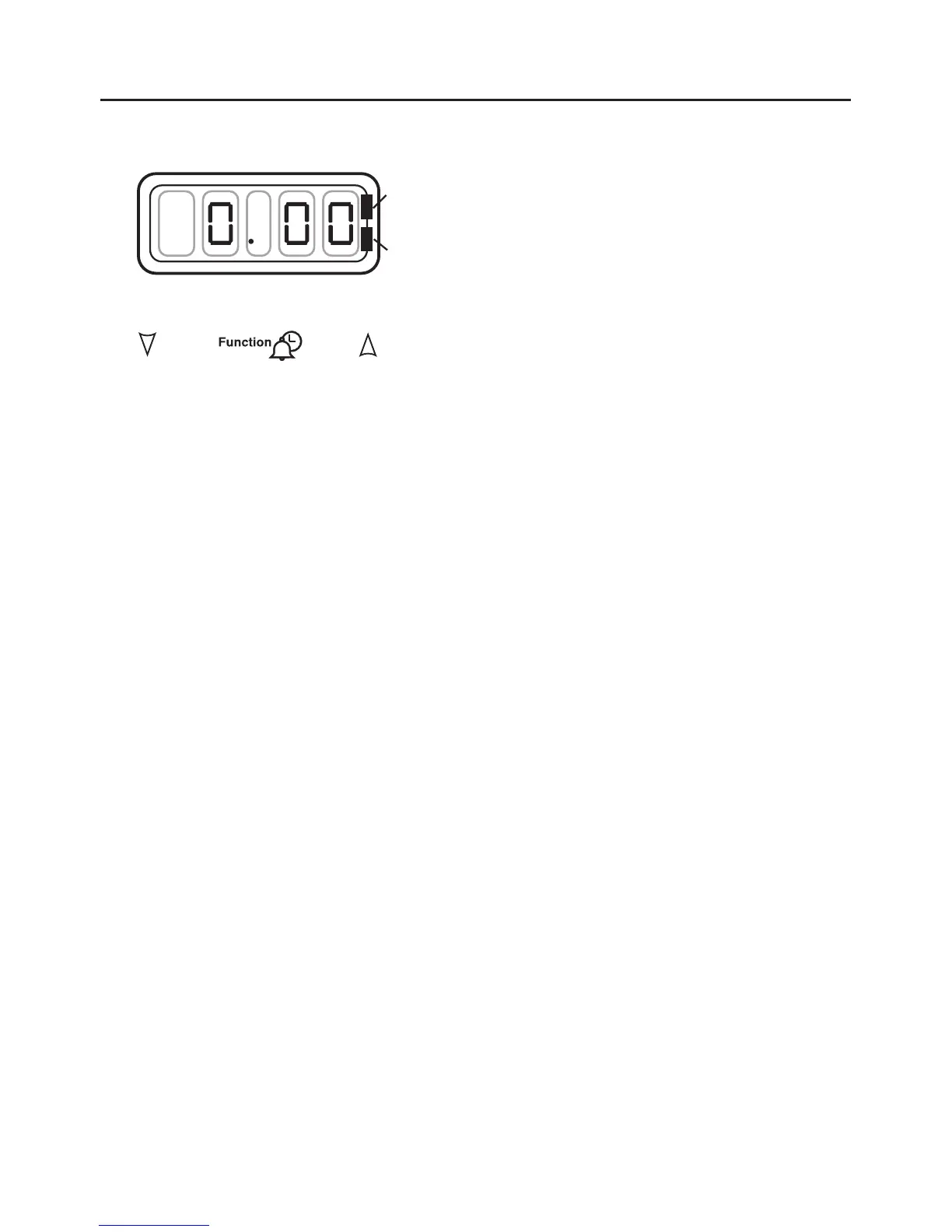
Initial display
The digital timer enables you to set the
time of day (24 hour clock) and the
minute minder alarm.
Setting the “Time of Day”
1. Switch on the electricity supply to
the appliance.
The clock adjust LED will flash
(bottom, right hand side).
2. Set the time of day with the plus
and minus buttons.
4. The time will be set 5 seconds after
the last plus or minus operation,
the LED will stop flashing and
remain illuminated.
Changing the time of day
1. Press the function button twice.
2. Set the time of day with the plus
and minus buttons.
3. The time will be set 5 seconds after
the last plus or minus operation,
the LED will stop flashing and
remain illuminated
Setting the minute minder
1. Press and release the Function
button to change the display from
clock to minute minder - the
Minute Minder LED will flash (top
right hand side)..
2. Use the plus and minus buttons to
set the length of time before the
alarm tone will sound.
The maximum period which may
be set is 23 hours 59 minutes.
During countdown, the minute
minder has priority on the display,
which will show (in hours / min-
utes) the time remaining.
When countdown is complete, the
tone will sound for 2 minutes, or it
can be reset with one touch of
any button.
To cancel the minute minder,
press the function button and run down
the set time with the minus button.
The display will revert to show the
time of day, and the minute minder
will not sound.
6


 To Next Page