14
Rev 6 Sep/2005
KMD 550/850 Quick Reference
AVAILABLE FIS FUNCTION ICONS
NEXRAD PAGE
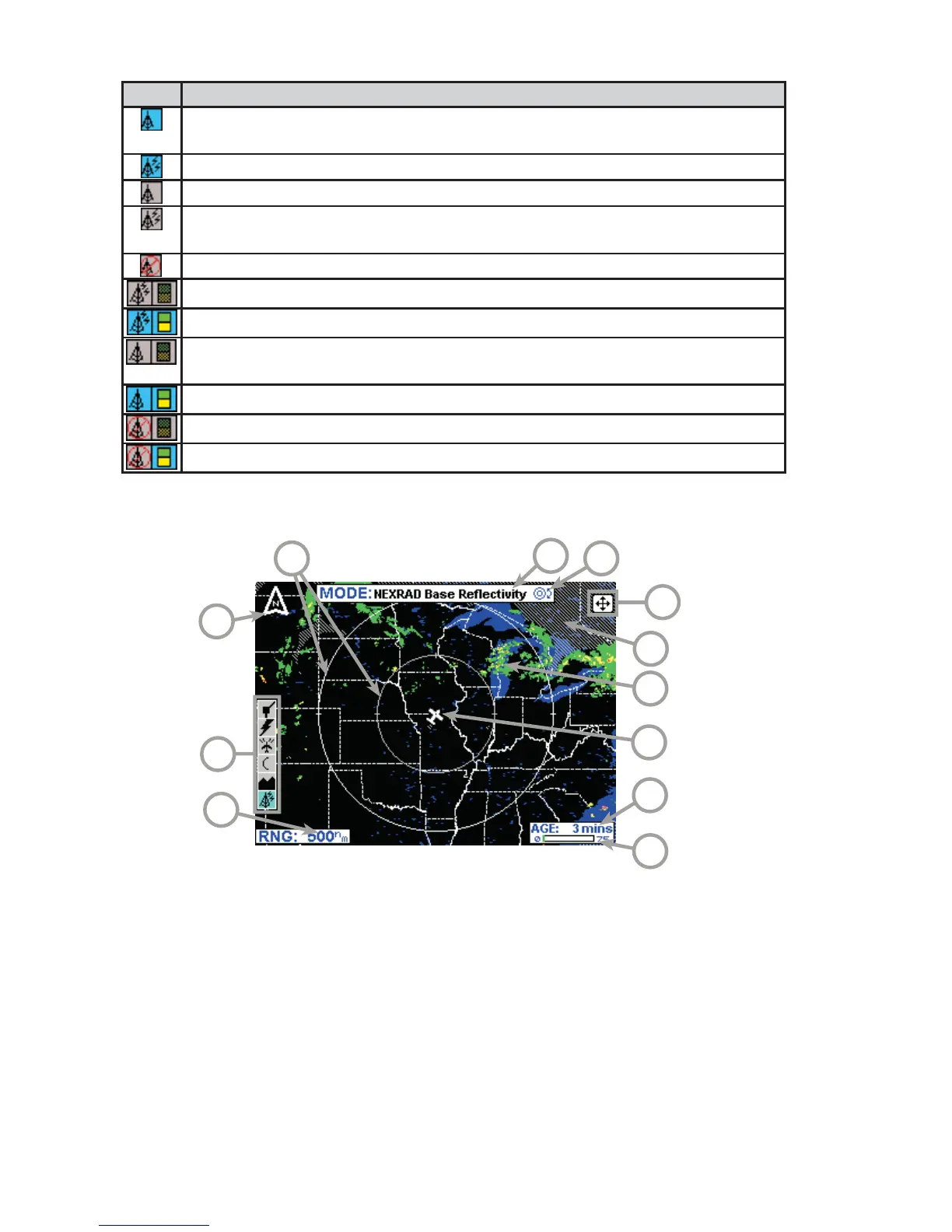
1 Range Scale - Indicated selected range.
2 Available Functions - Displays icons representing data available (black)
and displayed (color).
3 North Pointer - Indicates north.
4 Range Rings - Outer ring radius is selected range and inner ring radius
is one half the selected range.
5 MODE - Indicates the weather product being displayed.
6 Control Knob Icon - Displayed when the Control Knobs are available for
cycling through the graphical weather products.
7 Joystick Label - Indicates joystick is active and can be used to pan map.
8 No Coverage Area - Crosshatch pattern indicates area of no coverage.
9 Precipitation - NEXRAD precipitation returns.
10 Aircraft Symbol - Indicates present aircraft position and heading (if
available) or track.
11 Age of Data - Age of the data based on current time minus NEXRAD
issue time.
12 Age Status Bar - Indicates percentage of age versus elapsed time before
expiration. The bar will be green the first 50% then turn yellow.
2
5
1
3
6
4
11
7
10
8
9
12
Icon Description
No FIS data is currently being received but previously received data is being displayed
on the present page.
FIS data is currently being received from a signal and displayed on the present page.
FIS data is not being received or displayed on the present page.
FIS data is currently being received from a signal but not displayed on the present
page.
Fault with connection or data link radio.
FIS graphical METAR overlay is available but not displayed.
FIS graphical METAR overlay is enabled and displayed.
FIS data not being received. FIS graphical METAR overlay is available but not dis-
played.
FIS data not being received. FIS graphical METAR overlay is enabled and displayed.
VDL radio fault. FIS graphical METAR overlay is available but not displayed.
VDL radio fault. FIS graphical METAR overlay is enabled and displayed.



 To Next Page