Rev 6 Sep/2005 KMD 550/850 Quick Reference
7
WEATHER RADAR
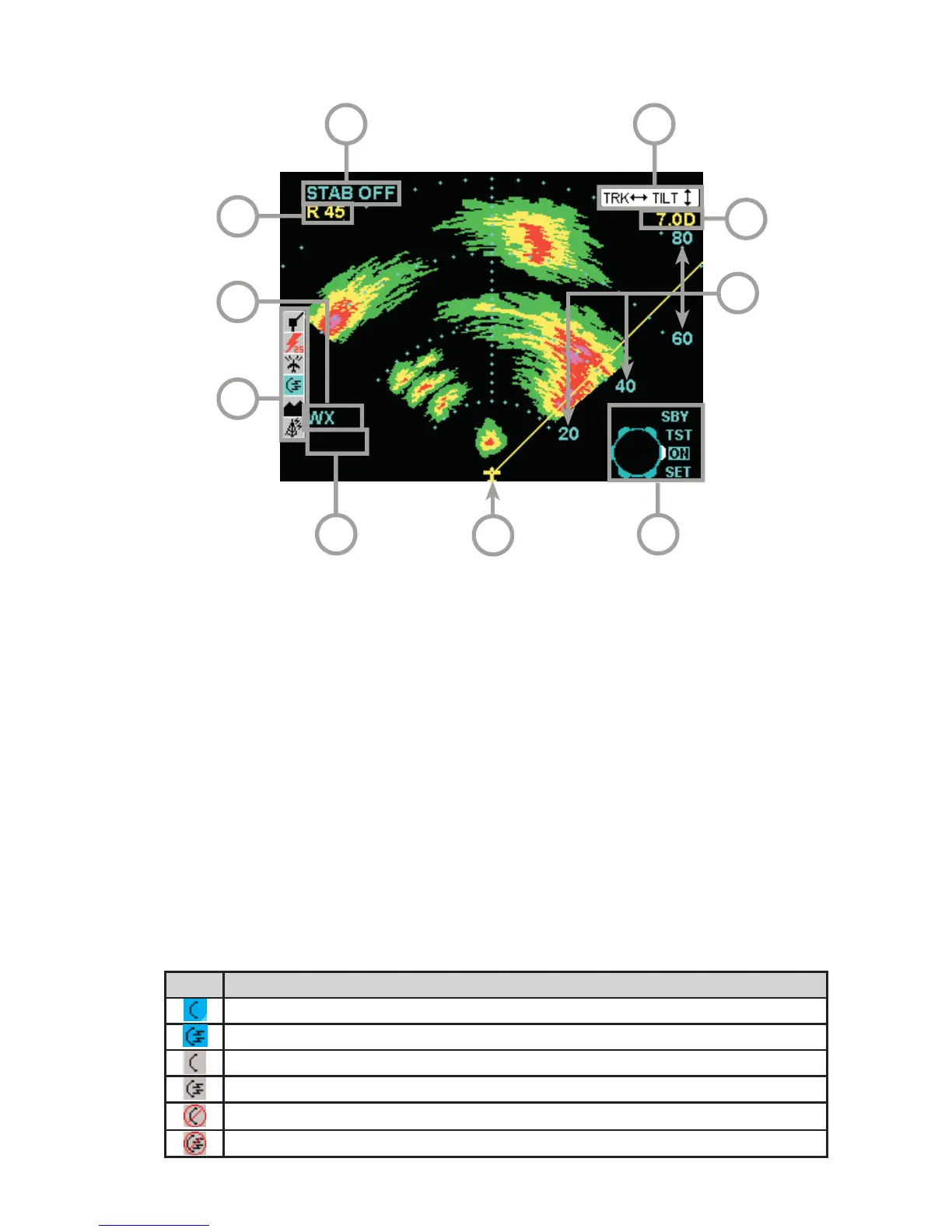
AVAILABLE WEATHER RADAR FUNCTION ICONS
1 Aircraft Symbol
2 Knob Function Label - Rotating the outer knob selects between
Standby (SBY), Test (TST), ON and SET modes.
3 Display Range Indications
4 Tilt Angle - XX.X Degrees up (U) or down (D).
5 Joystick Function Label - Moving the joystick up and down adjusts
the radar tilt. Moving the joystick left and right adjusts the location of
the yellow track line.
6 Stabilization Indication
7 Track Angle
8 WX Radar Mode Indication - TEST, WX, WX/ARL (Auto Range Limiting
or MAP (Ground Mapping Mode)
9 Available Functions - Displays icons representing data available
(black) and displayed (color)
10 Fault Message Window - See Error and Fault Messages
10
2
56
9
7
1
4
3
8
Icon Description
Standby weather radar being displayed.
Active weather radar being displayed.
Weather radar in standby mode, not being displayed.
Weather radar in active mode, not being displayed.
Weather radar data invalid / not being received. Previously in standby.
Weather radar data invalid / not being received. Previously active.



 To Next Page