6
Rev 6 Sep/2005
KMD 550/850 Quick Reference
OVERLAYING DATA
OVERLAY TYPE
DISPLAY FLIGHT PLAN STORMSCOPE
®
TRAFFIC FIS METAR
MAP - TOPO ON Yes Yes
1
Yes
2
Yes
MAP - TOPO OFF Yes Yes
1
Yes
2
Yes
WX - Weather Radar Yes
1
Yes Yes
3
No
WX - Stormscope
®
Yes
1
N/A No No
WX - NEXRAD Yes Yes
1
No No
WX - Graphical METARs Yes No No N/A
WX - Graphical AIRMETs Yes Yes
1
No No
WX - Graphical SIGMETs Yes Yes
1
No No
WX - Graphical Conv SIGMETs Yes Yes
1
No No
WX - Graphical Wx Watches Yes Yes
1
No No
TERR Yes Yes
1
Yes
2
No
TRFC Yes
1
No N/A No
1 Requires remote heading input
2 TCAS/TAS requires remote heading input
3 TIS requires remote heading input
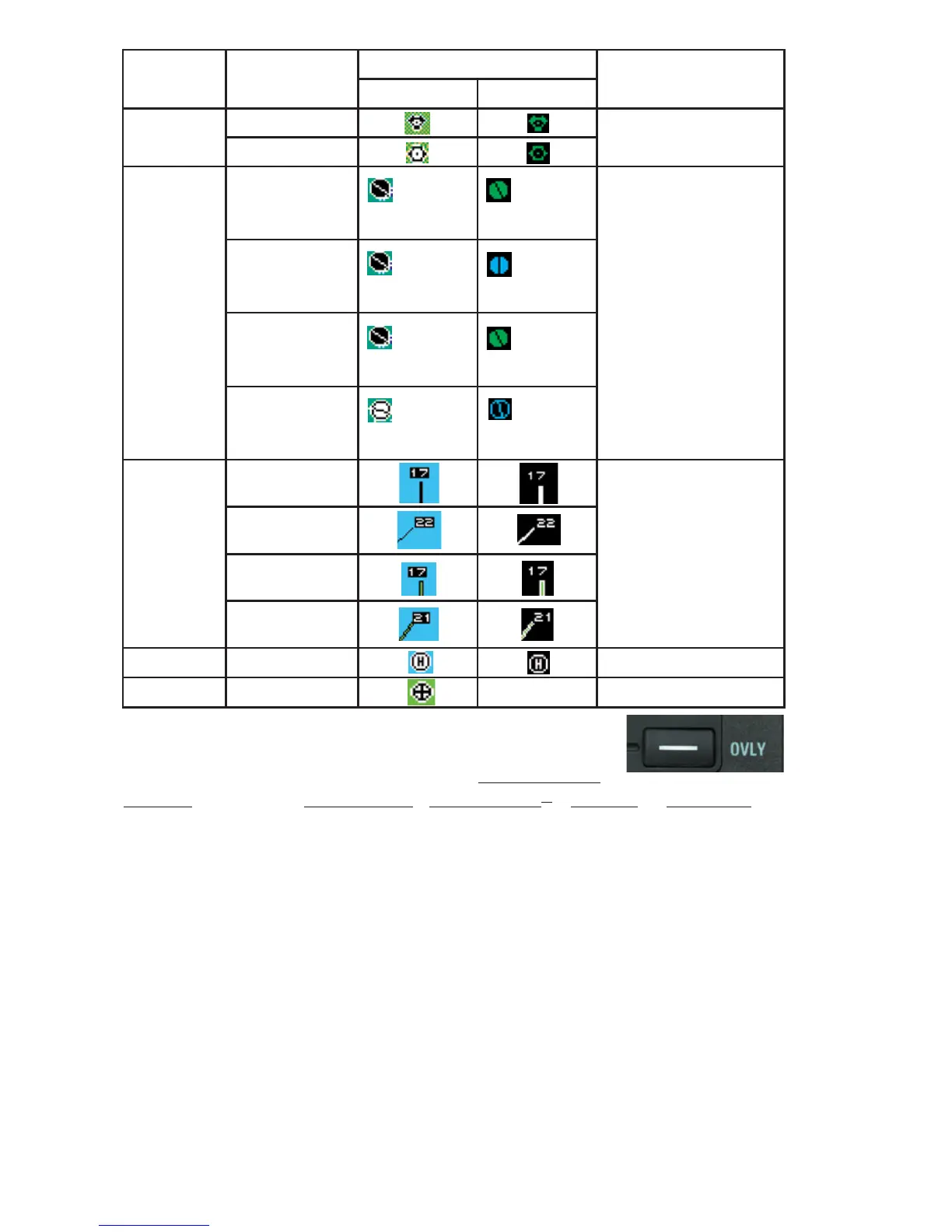
Feature Conditions Map Icons Other Characteristics
TOPO on TOPO off
VORs With DME
Without DME
Airports Hard runway +
IFR approach
Line rep-
resents
primary runway
Line rep-
resents
primary runway
If the database does not
have runways for the air-
port, then the icon will not
indicate a runway (no line
will be displayed).
Hard runway, no
IFR approach
Line rep-
resents
primary runway
Line rep-
resents
primary runway
IFR approach
available
Line rep-
resents
primary runway
Line rep-
resents
primary runway
Soft or unknown
runways
Line rep-
resents
primary runway
Line rep-
resents
primary runway
Airport
Runways
Primary, hard
surface
Runways are shown for
airports within 5 nm of
current position and
selected range is 10 nm
or less. Runway ends are
labeled with the proper
runway identifier if
selected range is 1 nm.
Other hard sur-
face
Primary soft sur-
face
Other soft sur-
face
Helipads
VRPs Not displayed



 To Next Page