8
Rev 6 Sep/2005
KMD 550/850 Quick Reference
STORMSCOPE
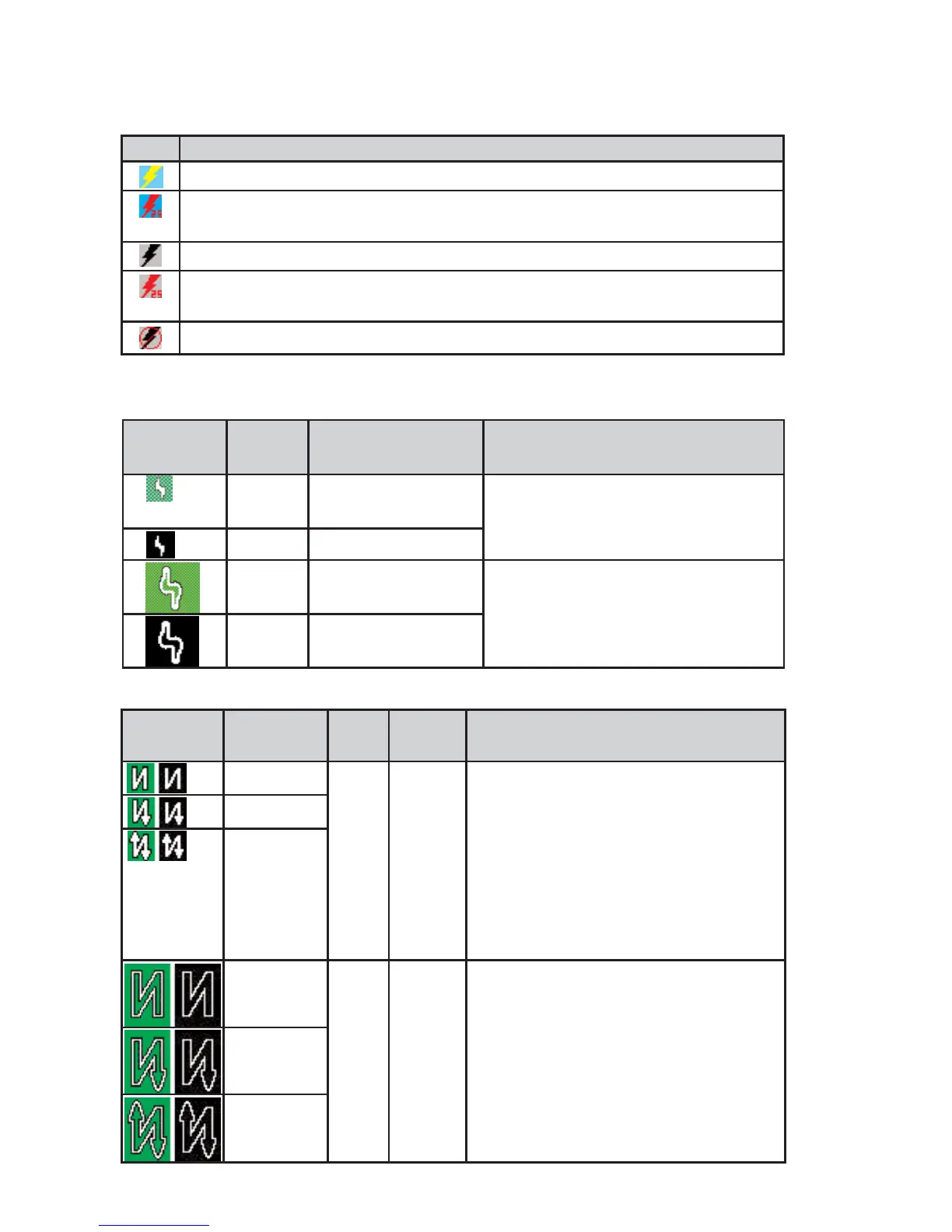
AVAILABLE STORMSCOPE FUNCTION ICONS
LIGHTNING ICONS
WX-500
WX-1000E
Icon Description
Stormscope
®
information being received and displayed.
Stormscope
®
information being received and displayed. Strikes have occurred within
25 nm.
Stormscope
®
information being received but not displayed.
Stormscope
®
information being received but not displayed. Strikes have occurred
within 25 nm.
Stormscope
®
information not being received / data invalid.
Lightning
Icon
Color Used on Pages Additional Requirements
White MAP (TOPO-ON or
TOPO-OFF)
The small solid icon is used when
the display selected range is 25 nm
or greater.
White WX, TRFC, TERR
White
Outline
MAP (TOPO-ON or
TOPO-OFF)
The large outlined icon is used when
the display selected range is less
than 25 nm.
White
Outline
WX, TRFC, TERR
Lightning
Icon
Intensity
Level
Color Used on
Pages
Comments
1 (Light) White
with
black
border
MAP,
WX,
TERR
The small solid icon is used when the dis-
play selected range is 25 nm or greater.
The WX-1000E indicates areas of lightning
detected (not individual discharges). Light
activity (level 1) is an area with up to 8
strikes/minute; moderate (level 2) is an area
with 9-25 strikes/minute and heavy (level 3)
is an area with 26 or more strikes/minute.
2 (Moderate)
3 (Heavy)
1 (Light) White
with
black
border
MAP,
WX,
TERR
The large outlined icon is used when the
display selected range is less than 25 nm.
The larger icon reminds the user that the
accuracy of lightning placement is not as
good as that suggested by the map scale.
2 (Moderate)
3 (Heavy)



 To Next Page