Rev 6 Sep/2005 KMD 550/850 Quick Reference
17
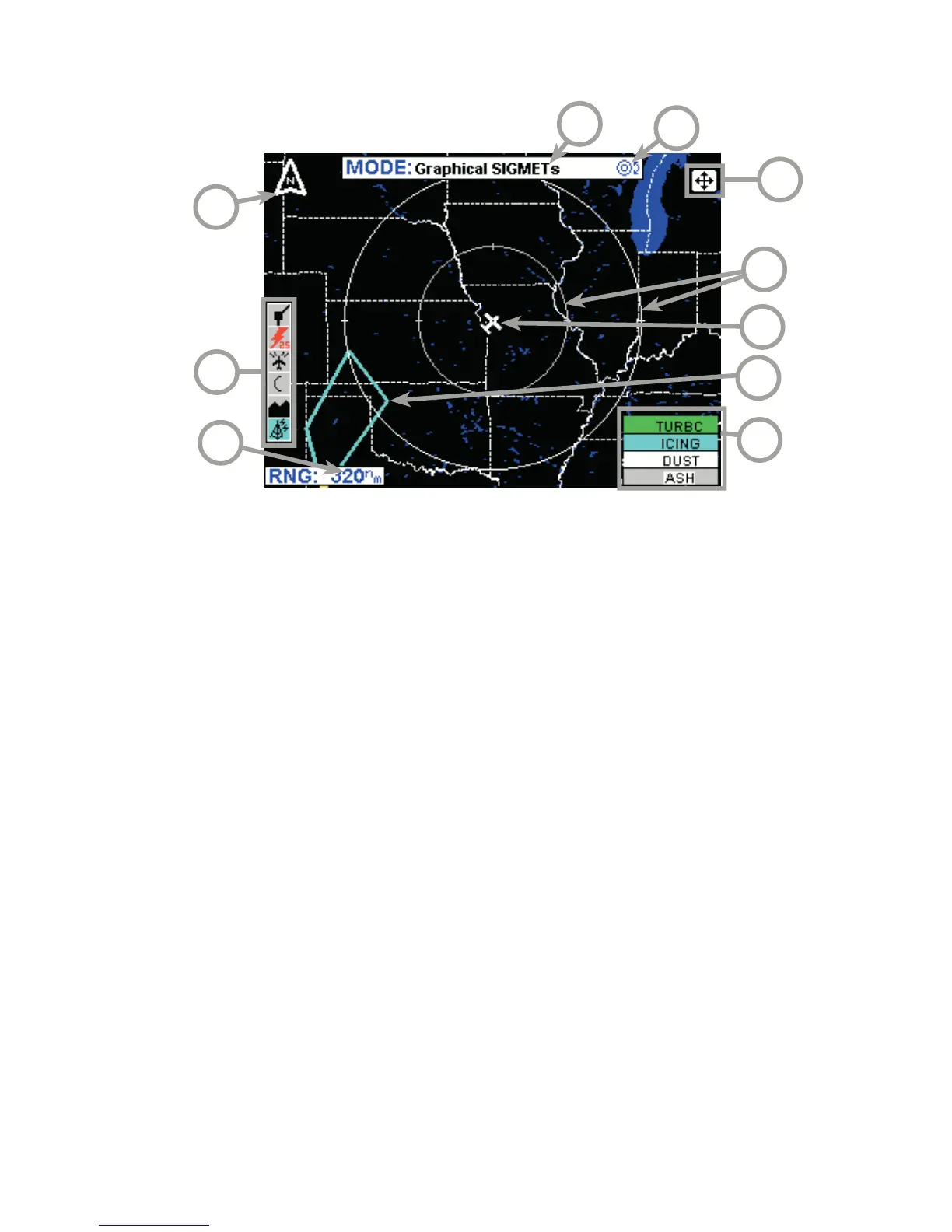
GRAPHICAL SIGMET PAGE
1 Range Scale - Indicated selected range.
2 Available Functions - Displays icons representing data available (black)
and displayed (color).
3 North Pointer - Indicates north.
4 MODE - Indicates the weather product being displayed.
5 Control Knob Icon - Displayed when the Control Knobs are available for
cycling through the graphical weather products.
6 Joystick Label - Indicates joystick is active and can be used to pan map.
7 Range Rings - Outer ring radius is selected range and inner ring radius
is one half the selected range.
8 Aircraft Symbol - Indicates present aircraft position and heading (if
available) or track.
9 SIGMET Boundary - Color coded line indicating the boundaries of a
SIGMET.
10 SIGMET Color Key - Colors indicating SIGMET type.
4
2
9
6
5
1
3
7
8
10



 To Next Page