Rev 6 Sep/2005 KMD 550/850 Quick Reference
25
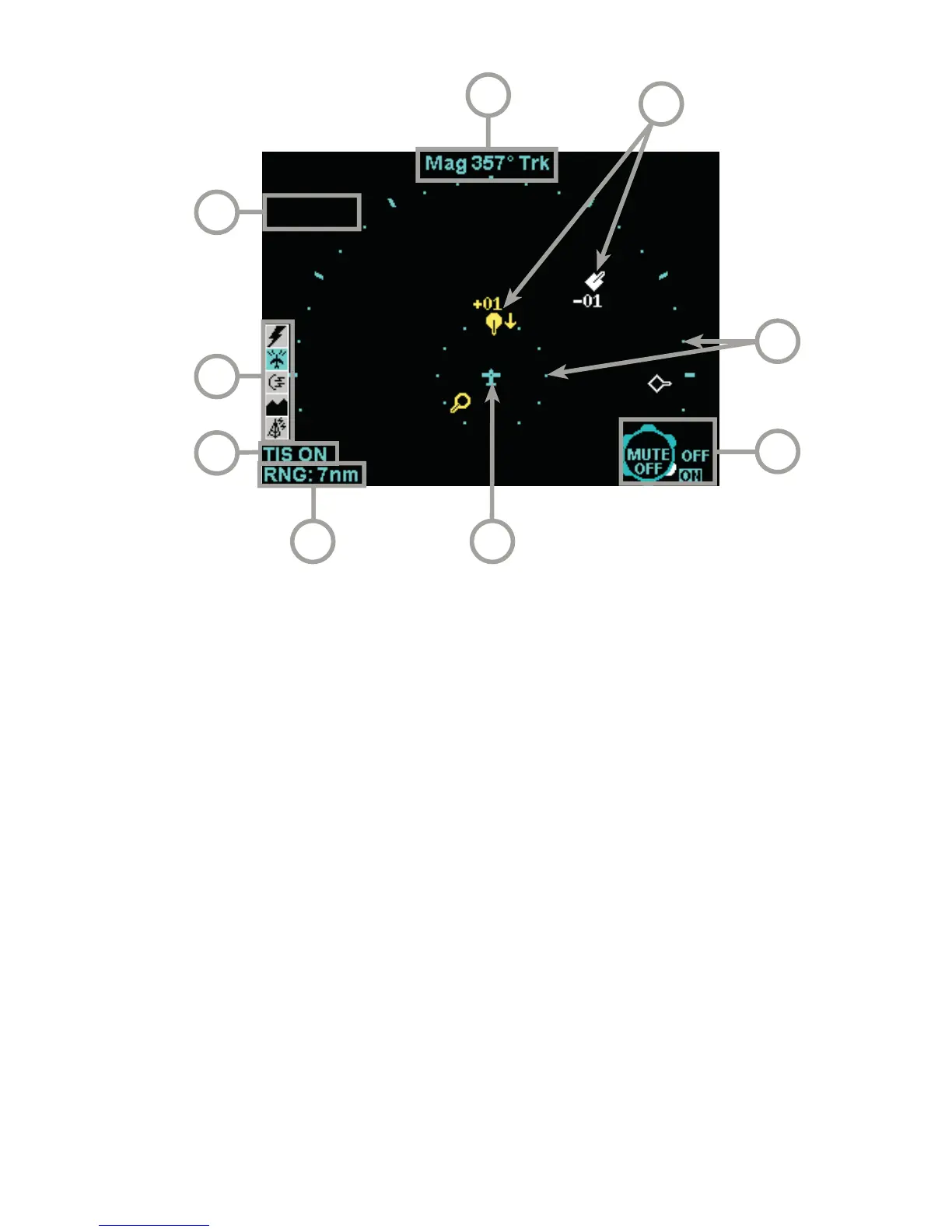
1 Display Range - RNG:##nm
2 TIS Operating Mode - TIS ON, TIS OFF or TIS FAIL
3 Available Functions - Displays icons representing data available (black)
and displayed (color).
4 Current Flight Level - FL:###
5 Display Orientation - When in magnetic heading-up orientation, Mag###°
Hdg; when in magnetic track-up orientation, Mag###° Trk; when heading
or track is not available from the system, No Hdg or Trk. The received traffic
bearing and ground track is corrected when the system has heading or track.
6 Traffic Intruder Symbols - Indicates type of traffic, altitude of traffic, vertical
trend of traffic and ground track of traffic.
7 Range Rings - Outer ring radius is selected range, inner ring radius is
always two nautical miles.
8 Knob Icon - Outer knob selects TIS ON or OFF. Inner knob selects MUTE
ON or MUTE OFF for muting of “TIS Unavailable” audio message.
9 Aircraft Symbol - Stylized airplane indicating aircraft position.
3
4
2
7
8
9
6
5
1



 To Next Page