Page15
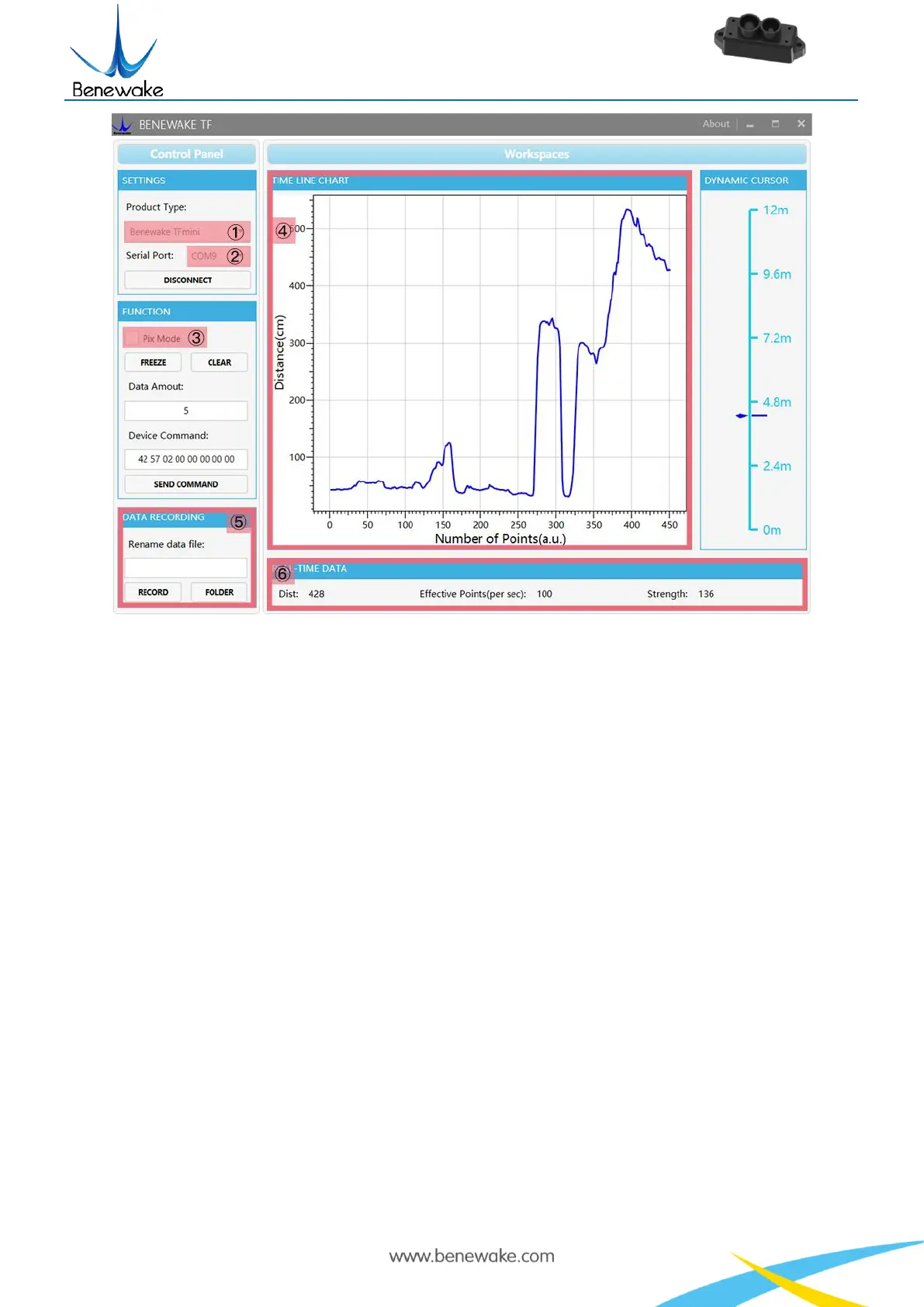
Figure 5 Software Interface and Display
Notes:
a) If no data is available in area “④TIME LINE CHART”, please check the line connection and
line sequence. When TFmini-S is successfully powered on, there will be a red indicator light
inside transmitting lens viewing from the front.
b) If the user want the TFmini-S output in the Pixhawk format, please select “③Pix Mode” at first,
otherwise area “④TIME LINE CHART” will not output the right data image normally. After Pix
Mode is checked, the unit of distance will be changed into m automatically.
c) The value of distance output Dist may vary with the output unit, which is cm by default. If the
unit of distance is changed to the unit-mm with specific command, and the PC software will be
unable to identify it, and so the unit of “④TIME LINE CHART” will still be cm. For example,
the actual TFmini-S measurement is 1m, the distance value of TFmini-S is 1000 in mm, the value
read by the PC software also is 1000, but the unit will not change and still display cm.
7 Descriptions on Parameter Configuration
7.1 Function Overview
The function of user-defined configuration of product parameters is hereby enabled for more flexible
settlement of your problems by TFmini-S. User may modify original parameters by sending relevant
commands, such as output data format and frame rate, etc.


 To Next Page