30
Software/Firmware Upgrade Process
z How to download
Hardware required
1. Standard RS232 Download cable (P/N: 5K.Y1301.001)
2. Personal computer or laptop computer
Software required
1. DDP2230 Composer lite
2. New version FW
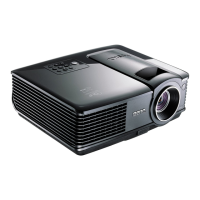
DDP2230 Composer lite install procedure
Installation Location
The default installation directory is:
C:\Program Files\DLP Composer Lite 7.0
If you want to install to a different directory (perhaps alongside a prior release of DLP
Composer™ Lite), click the "Browse" button on the "Select Features" page.
RS232 Support - Installation (All Platforms)
This release includes support for a RS232 communications interface to DDP2230-based
projectors. After DLP Composer™ Lite is installed,.
RS232 Support - Choosing the Serial Port interface
To select the RS232 communications interface, choose "Preferences" from the "Edit" menu, click
the "Communications" page and choose "Serial Port (DDP2000/DDP3020 Only)". You can now
use DLP Composer™ Lite to communicate with a DDP2230-based projector via RS232 using the
Flash Loader tool.


 To Next Page