Connection20
Connecting video streaming dongle - QCast
(optional accessory)
This dongle allows you to perform a wireless projection from your smart device or
computer. To purchase the QCast dongle, contact your local dealer.
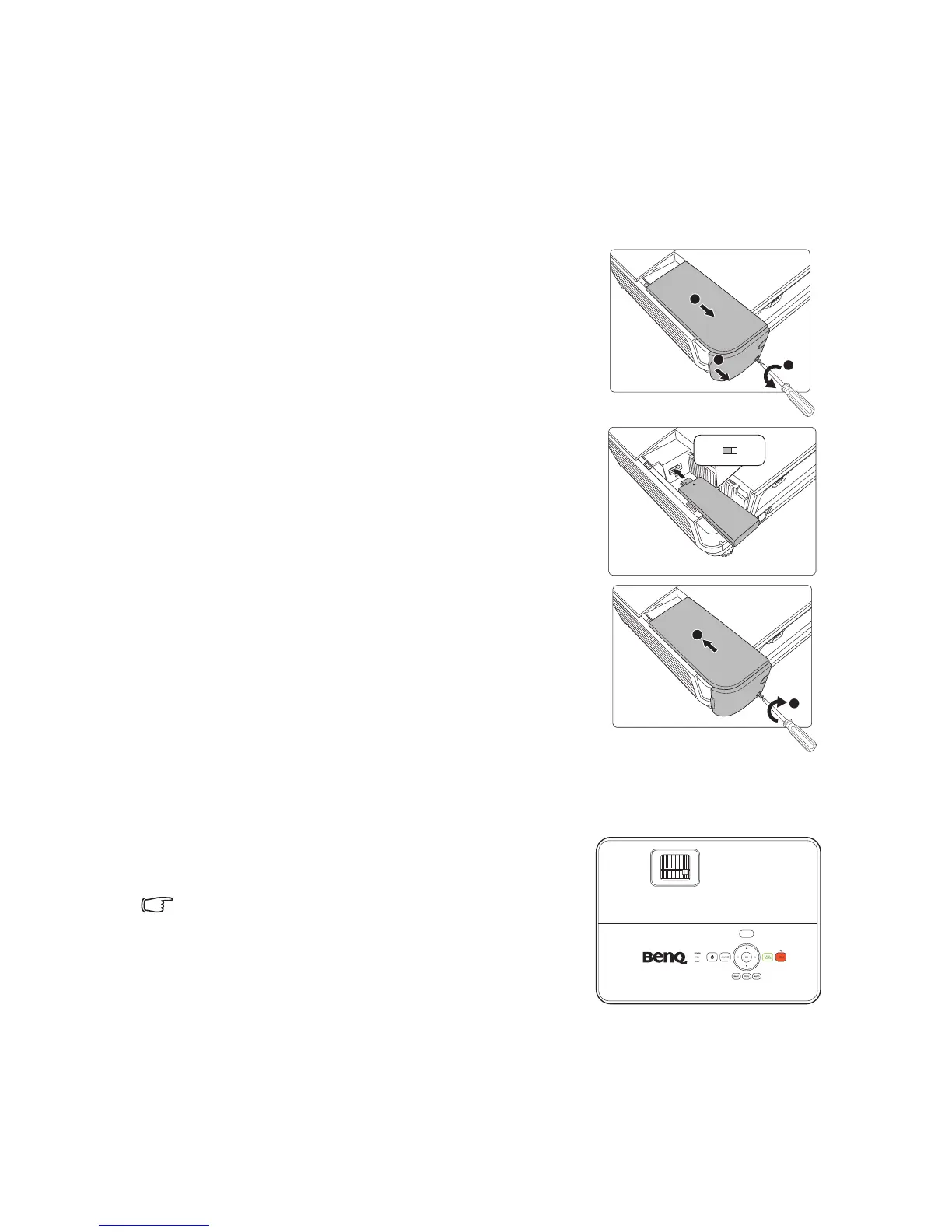
Installation
1. Loosen the screw that secures the wireless cover
and open the wireless cover.
2. Slide the switcher on the dongle to MHL and
connect the dongle to the HDMI-2/MHL port.
3. Replace the wireless cover and tighten the screw
that secures the wireless cover.
Starting the wireless projection
1. Turn on the projector.
2. After the QCast dongle is properly connected to
the HDMI-2/MHL port, the LED indicator lights
up orange.
When other MHL dongle or a MHL cable with a MHL-enabled
device connected is plugged into the HDMI-2/MHL port, the LED
indicator lights up orange.
3. Enable the wireless function using the QCast
dongle by one of the following steps.
2
2
1
MHL
USB



 To Next Page