Connection22
Connection
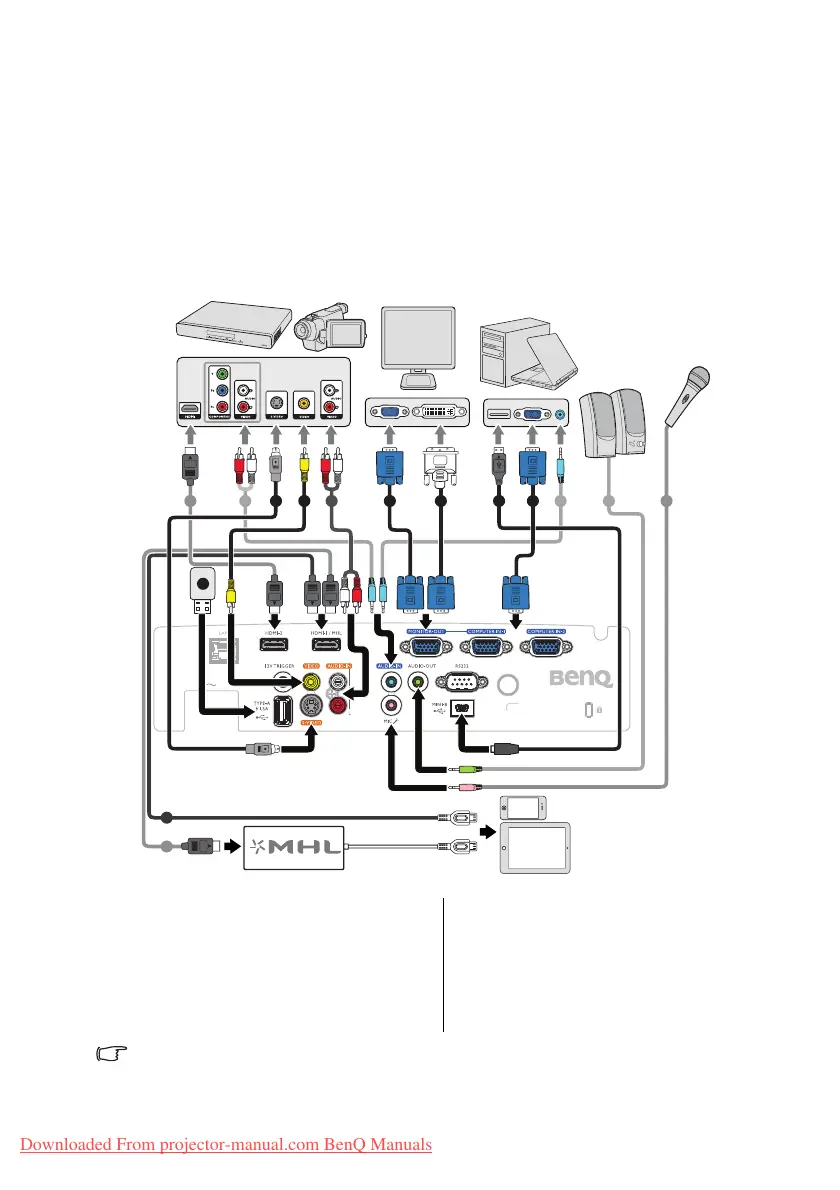
When connecting a signal source to the projector, be sure to:
1. Turn all equipment off before making any connections.
2. Use the correct signal cables for each source.
3. Ensure the cables are firmly inserted.
In the connections shown below, some cables may not be included with the projector (see
"Shipping contents" on page 9). They are commercially available from electronics stores.
Many notebooks do not turn on their external video ports when connected to a projector.
Usually a key combo like FN + F3 or CRT/LCD key turns the external display on/off. Locate a
function key labeled CRT/LCD or a function key with a monitor symbol on the notebook. Press
1. HDMI cable
2. Audio cable
3. S-Video cable
4. Video cable
5. Audio L/R cable
6. VGA cable
7. VGA to DVI-A cable
8. USB cable
9. Microphone
10. Type-A port power 1.5A
11. HDMI-Micro USB cable
1 2 3 4 5 6 7 8 6 2 2 9
10
11
1
Notebook or desktop
computer
A/V device
Speakers
Monitor
(VGA) (DVI)
or
Microphone
Smartphone or
tablet
or
Downloaded From projector-manual.com BenQ Manuals



 To Next Page