Apps
54
Apps
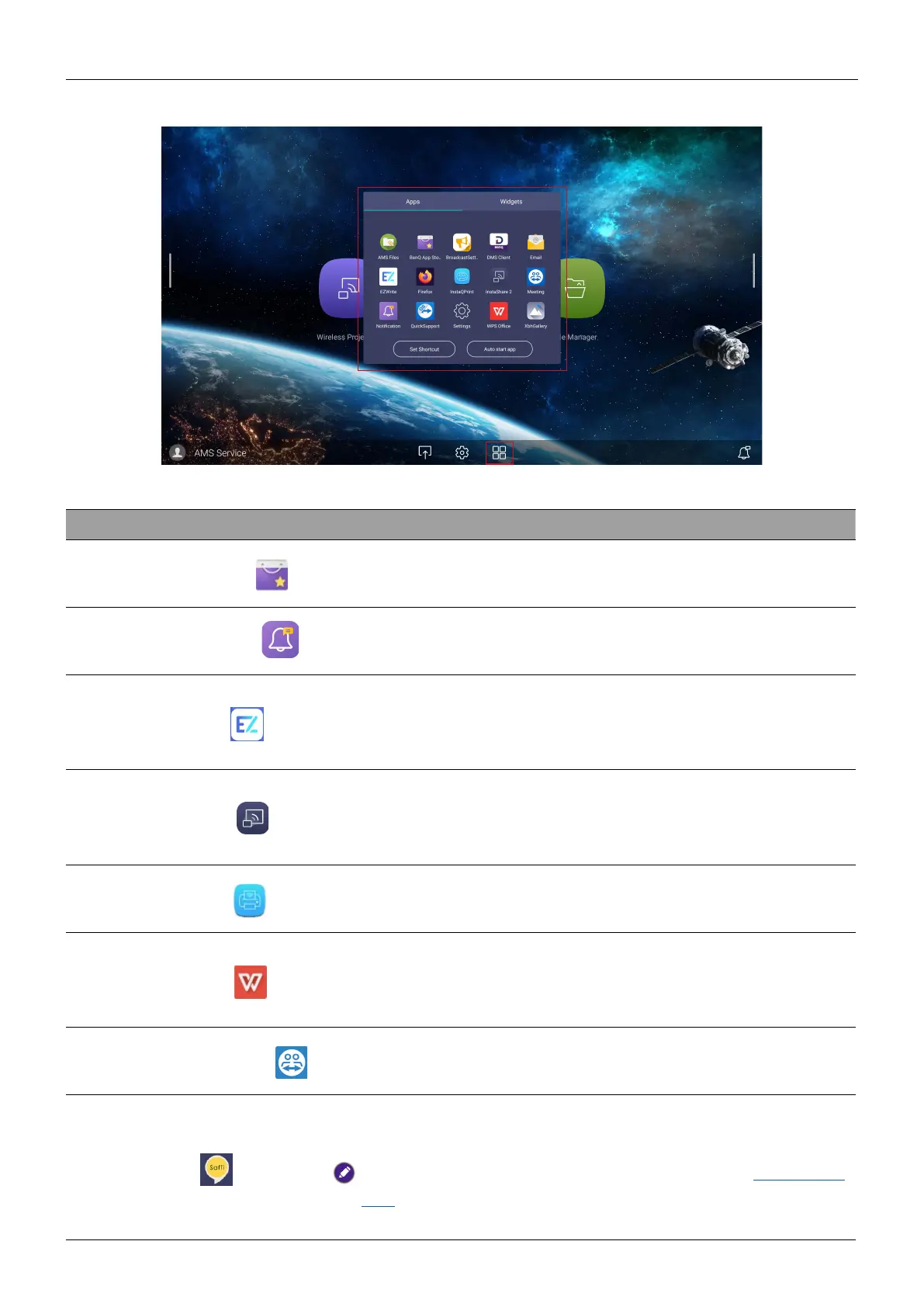
Tap the desired app to launch the app.
Application Name Description
BenQ App Store (
)
Allows you to download recommended apps. See BenQ
App Store on page 55 for more information.
BenQ Notification (
)
Allows you to receive upgrade notifications of existing
apps and information of new apps available for download.
EZWrite 6 (
)
An interactive whiteboard software solution that turns
your display into a digital canvas. See Using touch pen to
launch EZWrite on page 15.
InstaShare 2 (
)
Allows screen mirroring and touch control for
collaborative meetings. See InstaShare 2 on page 56 for
more information.
InstaQPrint (
)
Allows you to print a file or website image using a Wi-Fi or
remote printer.
WPS Office (
)
Allows you to read PDF files or edit files created in
Microsoft Office, PowerPoint, or Excel. See WPS Office on
page 58 for more information.
TeamViewer Meeting (
)
Gives you access to instant or scheduled group meetings
with any other TeamViewer Meeting users.
Saffi (
)
Allows you to control your display through voice assistant.
See Using remote control on page 12.
Find Saffi User Manual for more information. Go to www.BenQ.
com > Business > SUPPORT > Downloads > model name >
User Manuals > Saffi User Manual.


 To Next Page