EasyManua.ls Logo

BenQ SH753P - Obtaining a Preferred Projected Image Size

BenQ SH753P
76 pages
Print Icon
To Next Page IconTo Next Page
To Previous Page IconTo Previous Page
Loading...
18
Positioning your projector
Obtaining a preferred projected image size
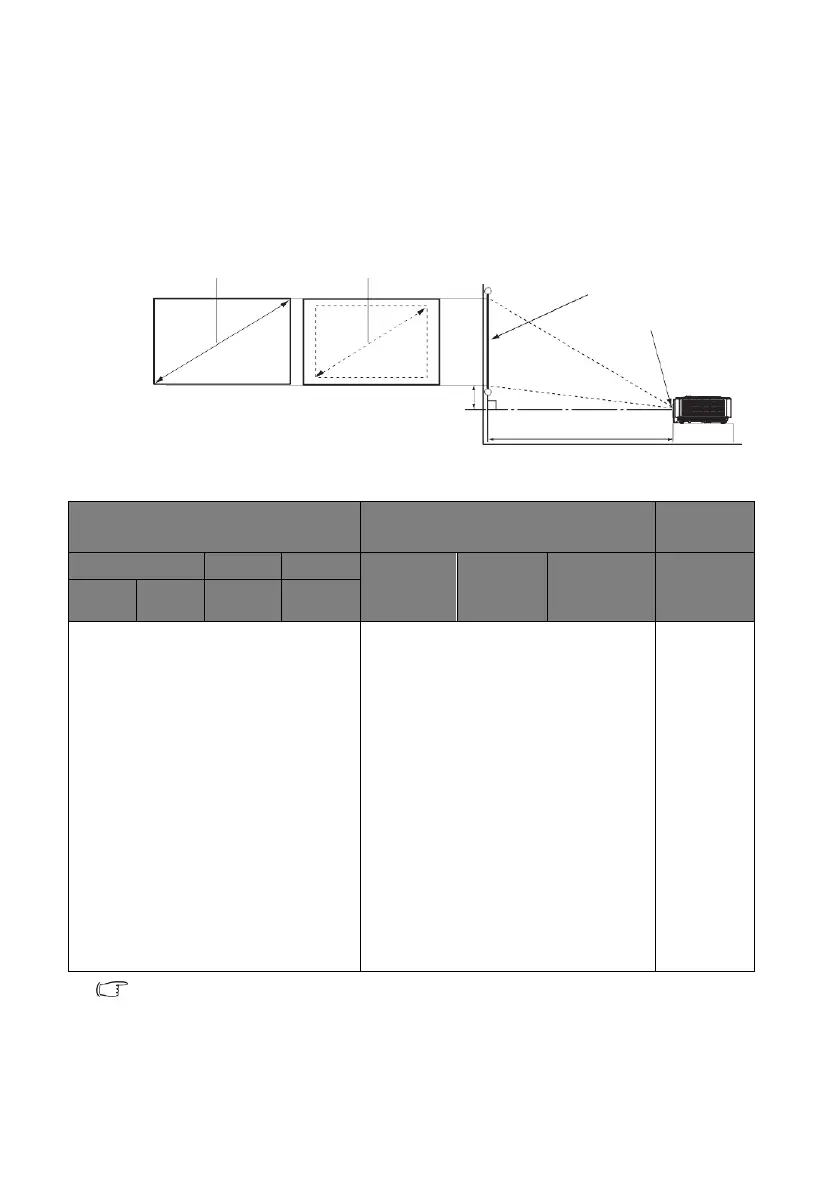
The distance from the projector lens to the screen, the zoom setting (if available), and the
video format each factors in the projected image size.
Projection dimensions
Refer to "Dimensions" on page 72 for the center of lens dimensions of this projector
before calculating the appropriate position.
H
1080P SH753P
Screen size
Distance from screen [mm]
Offset
[mm]
Diagonal
Width
Height
Min Dis-
tance
Average
Max Dis-
tance
A [mm] @
Wide
mode
inch
mm
mm
mm
60
1524
1328
747
1846
2311
2776
111
70
1778
1550
872
2154
2696
3239
130
80
2032
1771
996
2462
3082
3701
149
90
2286
1992
1121
2769
3467
4164
167
100
2540
2214
1245
3077
3852
4627
186
120
3048
2657
1494
3693
4622
5552
223
150
3810
3321
1868
4616
5778
6940
279
170
4318
3763
2117
5231
6548
7866
316
180
4572
3985
2241
5539
6934
8328
334
190
4826
4206
2366
5847
7319
8791
353
200
5080
4428
2491
6154
7704
9254
371
250
6350
5535
3113
7693
9630
11567
464
300
7620
6641
3736
9232
11556
13881
557
There is 5% tolerance among these numbers due to optical component variations. BenQ
recommends that if you intend to permanently install the projector, you should physically test
the projection size and distance using the actual projector before you permanently install it, so
as to make allowance for this projector's optical characteristics. This will help you determine
the exact mounting position so that it best suits your installation location.
Maximum zoom
Minimum zoom
Screen
Center of lens
W
Vertical offset A
Projection distance