Using the menus
The projector is equipped with On-Screen Display (OSD) menus for making various
adjustments and settings.
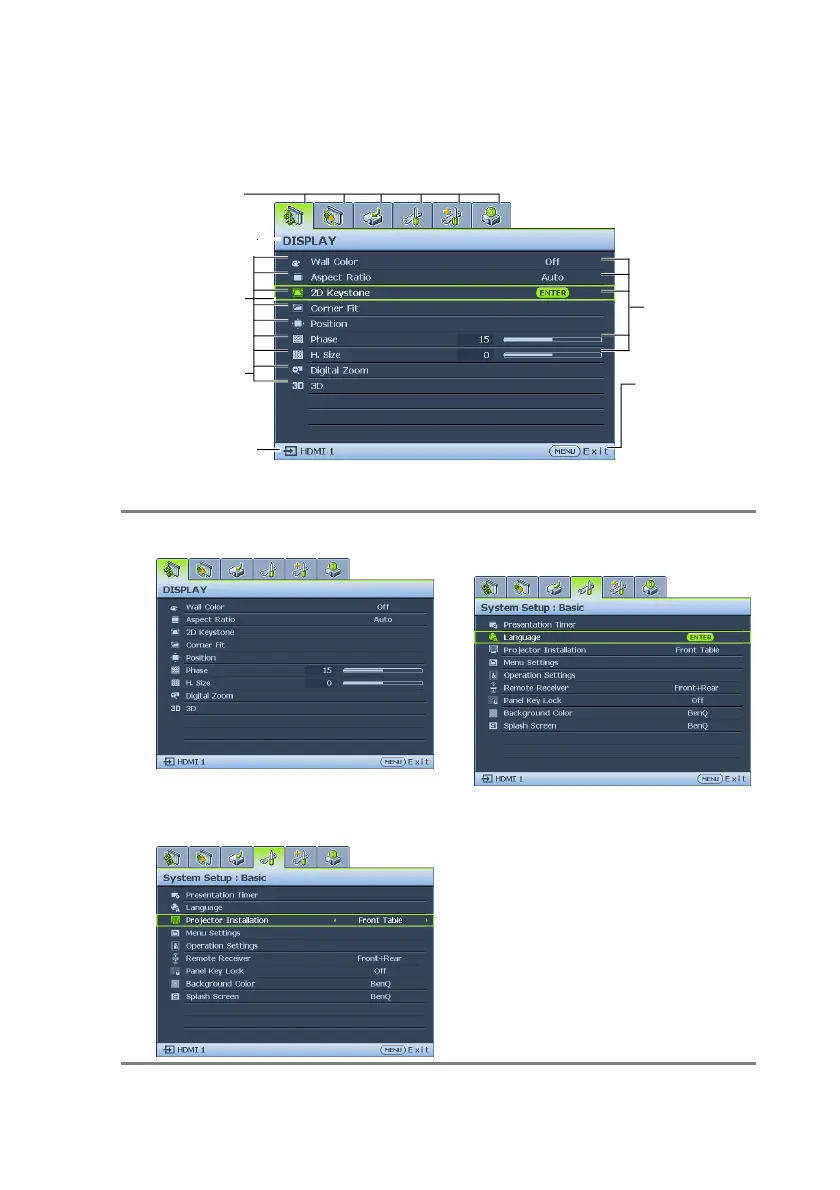
Below is the overview of the OSD menu.
Main menu icon
Main menu
Highlight
Status
Sub-menu
Current
input signal
To use the OSD menus, please set them to your familiar language first.
Press MENU/
EXIT to the
previous page
or to exit.
1.
Press MODE/ENTER on the projector or 3. Press ▼ to highlight Language
remote control to turn the OSD menu on.
2.
Use ◄/► to highlight the System Setup:
Basic menu.
and press ◄/► to select a
preferred language.
4.
Press MODE/ENTER twice* on
the projector or remote control
to leave and save the settings.
*The first press leads you back to the
main menu and the second press
closes the OSD menu.


 To Next Page