The OSD (On-Screen Display) menu34
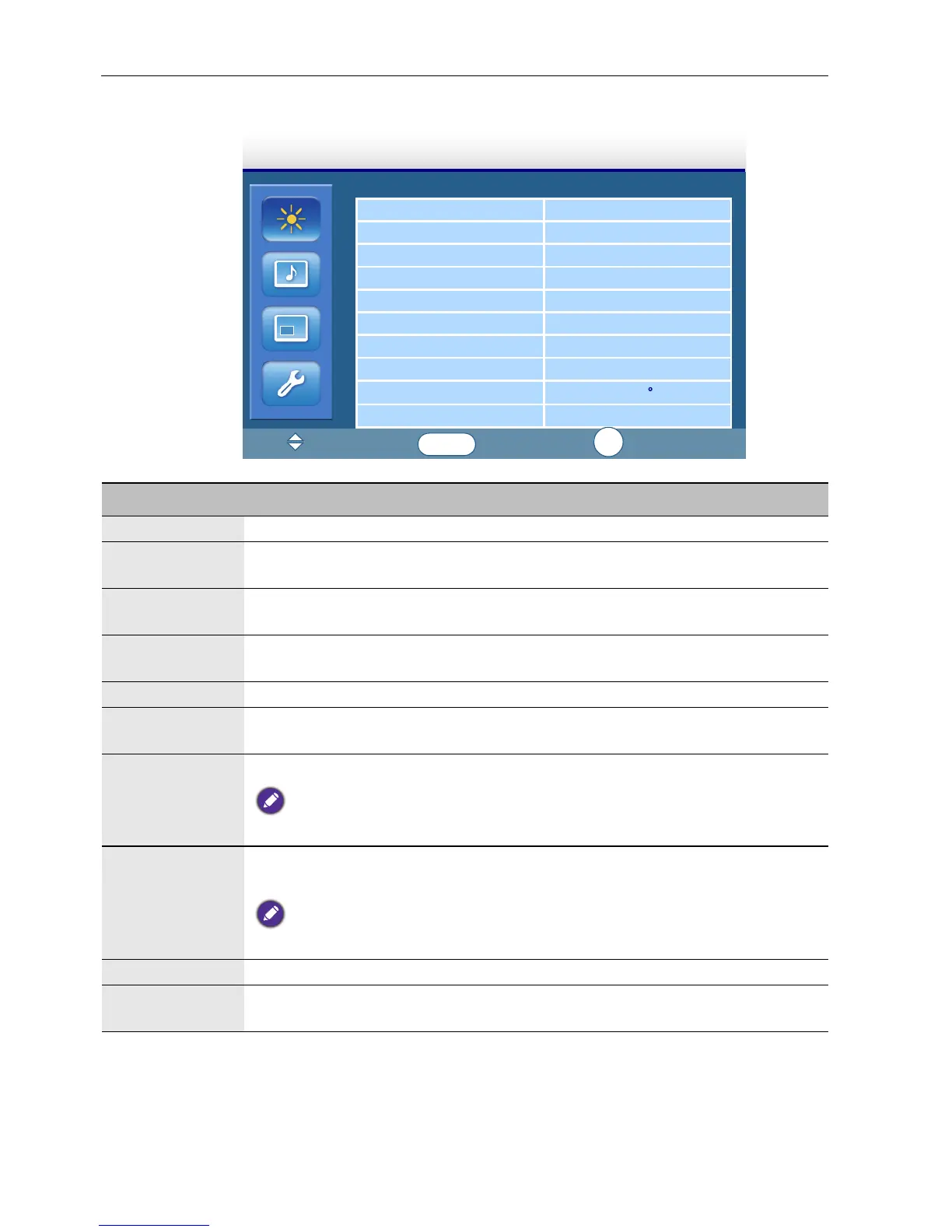
Picture menu
Picture Mode Standard
Contrast 88
Brightness 43
Color 55
Tint 50
Sharpness 5
Backlight 5
DCR OFF
Color Temp
9300 K
Input Resolution Auto
:Move
:Input
:Exit
Picture
ENTER
EXIT
Name Description
Picture Mode Sets the display mode.
Contrast Adjusts the image contrast when Picture Mode is set to
User.
Brightness Adjusts the image brightness when Picture Mode is set to
User.
Color Adjusts the color intensity when Picture Mode is set to
User.
Tint Adjusts the color tint when Picture Mode is set to User.
Sharpness Adjusts the image sharpness when Picture Mode is set to
User.
Backlight
Adjusts the backlight intensity for the screen.
This feature is not available if the Ambient Light Sensor function is set to HIGH
or LOW.
DCR
Tu r n s t h e DCR function on or off. This feature enhances image contrast for
dark scenes.
This feature is not available if the Ambient Light Sensor function is set to HIGH
or LOW.
Color Temp
Adjusts the color temperature.
Input
Resolution
Sets the VGA input resolution. This is only required when the display
cannot detect the resolution correctly.



 To Next Page