The OSD (On-Screen Display) menu38
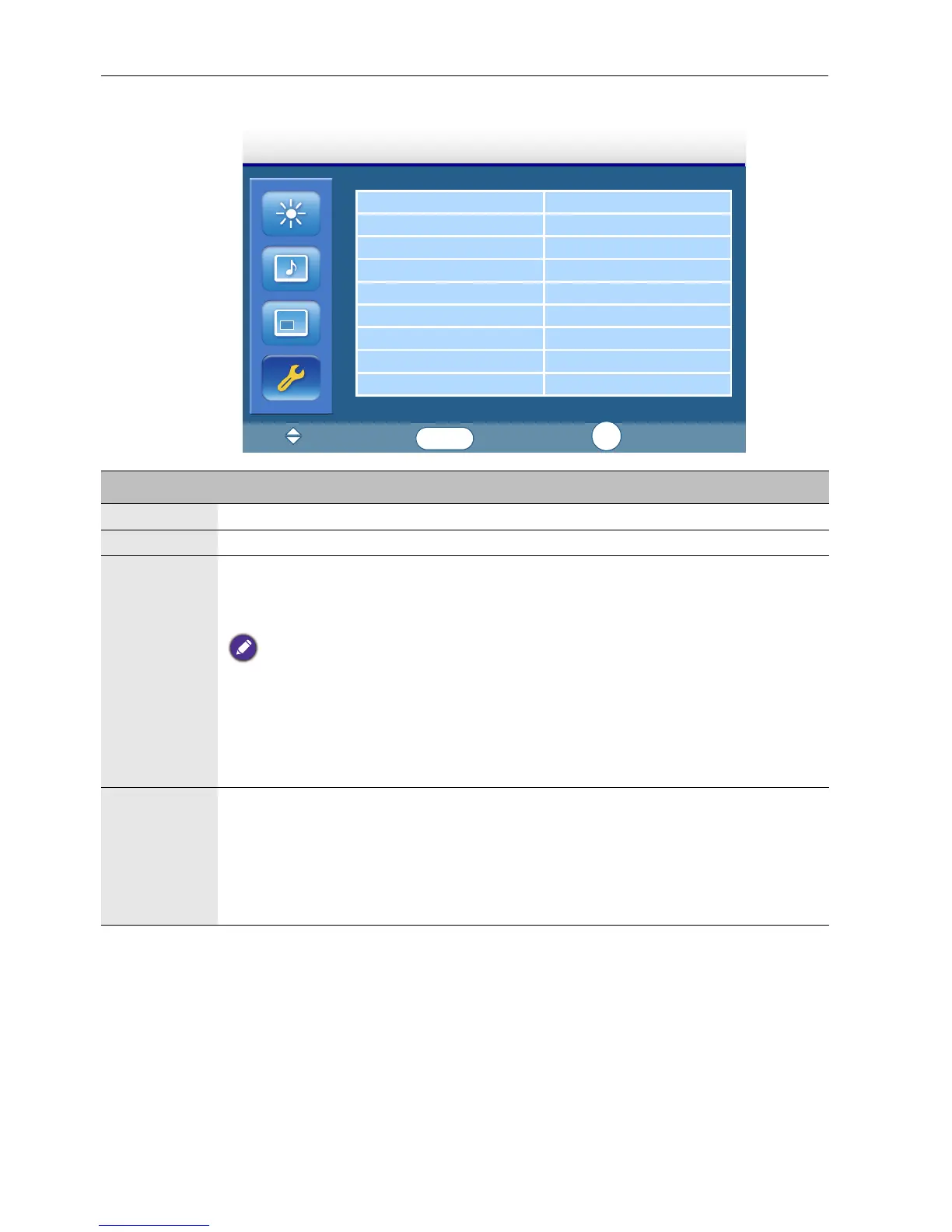
Setting menu
Language English
Overscan
Schedule
Display Wall
Power Save Standard
Set Monitor ID 1
Image Retention ON
Auto Adjustment ON
Advanced
Setting
:Move
:Input
:Exit
ENTER
EXIT
Name Description
Language Sets your preferred language for the OSD menu.
Overscan Turns the HDMI overscan function on or off.
Schedule • Date and Time: Sets the current date and time.
• Schedule: Sets when to turn on or off the display and which input source
should be used for each schedule.
• Set the current time before you set the Schedule.
• When schedule settings overlap, the Every Day setting takes priority over other weekly
settings.
• When schedule settings overlap, scheduled power-on time takes priority over scheduled
power-off time.
• If two schedules have the same settings, the first schedule on the list will take priority.
Display
Wall
• H Monitors/V Monitors: Sets the number of displays used in the horizontal/
vertical position.
• H Position/V Position: Sets the horizontal/vertical position of the display
wall matrix.
• Frame Comp.: Adjusts images near the display edges for optimal
demonstration across the display wall.


 To Next Page