Standard Programmer Times.
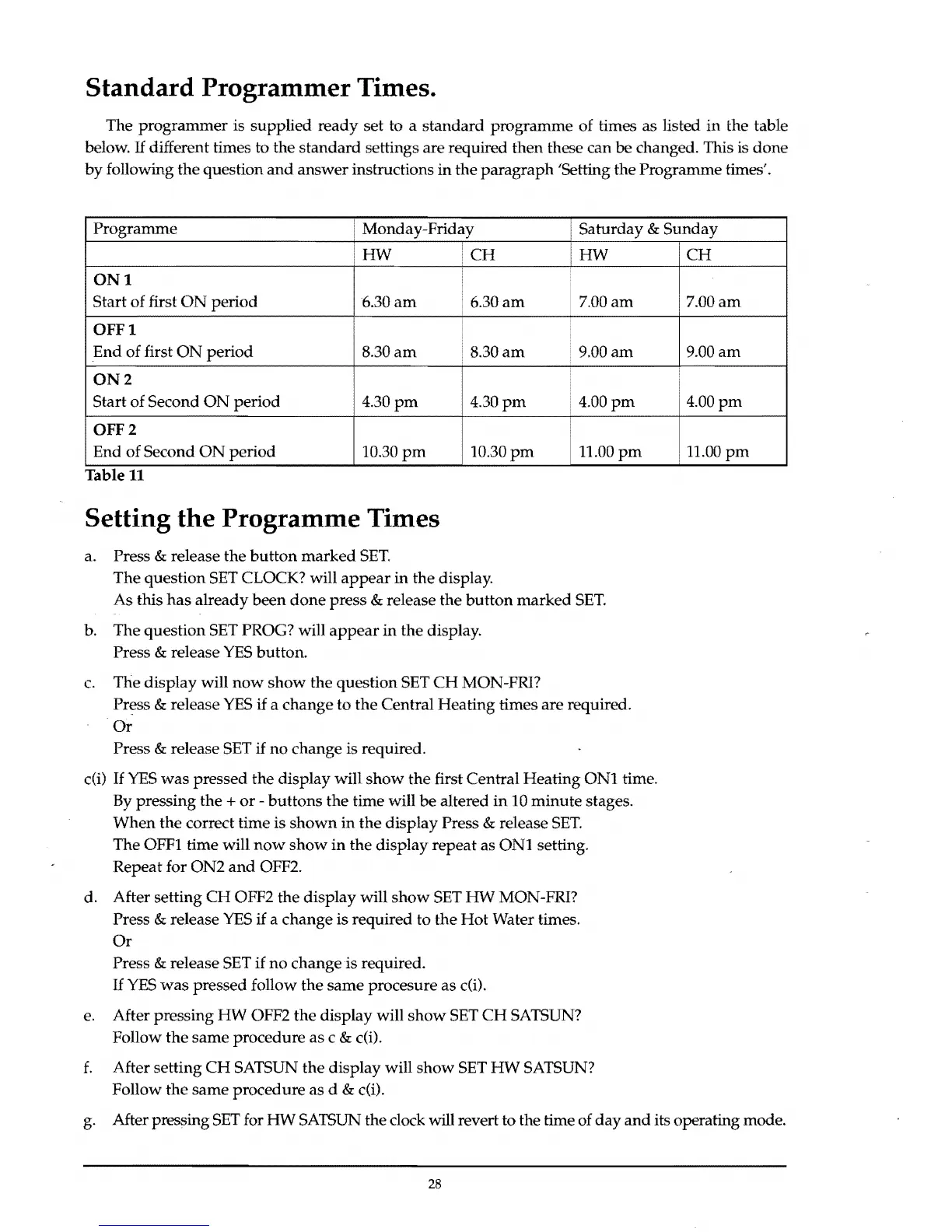
The
programmer
is supplied
ready
set to a
standard
programme
of times
as
listed
in
the table
below.
IT
different times to the
standard
settings are required then these can be changed. This is
done
by
following
the
question
and
answer instructions
in
the
paragraph
'Setting the Programme times'.
Programme
Monday-Friday
Saturday
&
Sunday
HW
iCH
HW
CH
ONt
Start
of
first
ON
period
•
6.30
am
6.30
am
7.00
am
7.00
am
OFFt
End
of first
ON
period
8.30
am
8.30
am
9.00
am
9.00
am
ON2
Start of Second
ON
period
4.30
pm
4.30
pm
4.00
pm
4.00
pm
OFF 2
End of Second
ON
period
10.30
pm
10.30
pm
11.00
pm
i 11.00
pm
Table
11
Setting the Programme Times
a. Press & release the
button
marked
SET.
The question SET CLOCK? will
appear
in
the
display.
As
this
has
already
been
done
press
& release the
button
marked
SET.
b. The
question
SET PROG? will
appear
in
the display.
Press
& release
YES
button.
c.
The display will
now
show
the question SET
CH
MON-FR1?
Press
& release
YES
if a
change
to
the
Central
Heating
times are required.
Or
Press & release SET
if
no
change is required.
cm
If
YES
was
pressed
the display will
show
the
first Central
Heating
ONI
time.
By pressing
the
+
or
-
buttons
the time will
be
altered
in
10
minute
stages.
When
the
correct time is
shown
in
the
display
Press & release
SET.
The
OFFl
time will
now
show
in
the
display
repeat
as
ONI
setting.
Repeat for
ON2
and
OFF2.
d. After setting
CH
OFF2 the
display
will
show
SET
HW
MON-FRI?
Press
& release
YES
if
a change is required
to
the
Hot
Water times.
Or
Press & release SET
if
no
change
is
required.
IT
YES
was
pressed follow the
same
procesure
as
c(i).
e. After pressing
HW
OFF2
the
display will
show
SET
CH
SATSUN?
Follow
the
same
procedure as c & c(i).
f.
After setting
CH
SATSUN
the
display will
show
SET
HW
SATSUN?
Follow the
same
procedure
as d & cm.
g. After pressing
SET
for
HW
SATSUN the clock will revert to the time of
day
and
its operating mode.
28



 To Next Page