Copyright © BEP Marine Limited, All rights reserved
INST-600-GD-V5
29/11/07
Page 8
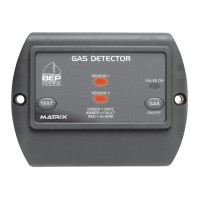
13 Test / Alarm Mute Button
When the ‘TEST’ button is pressed in normal operation mode it will -
Turn on the external alarm
Turn on the blower
Turn off the solenoid
Sounds the keyboard beeper
Turn light red
Pressing the ‘TEST’ button again cancels the above.
When the unit is in alarm mode, pressing the ‘TEST’ button will turn off the external alarm but the
keyboard alarm will continue to sound. The detector will stay in alarm mode until the gas disperses.
14 Bypass Mode
This is a 600-GDL feature only. Bypass mode disables the sensors. It is important to note that the
bilge blower and external alarm features of the 600-GDL are also disabled.
To achieve bypass mode press and hold the ‘TEST’ button for approximately 15 seconds until the
sensor LEDs start to flash (green or amber). The sensor LEDs will then continue to flash (1 sec on, 1
sec off) to indicate that the sensor(s) are in bypass mode.
Once the fault has been rectified, press and hold the ‘TEST’ button until the ‘VALVE ON’ LED comes
on. Bypass mode is turned off when the button is released. The 600-GDL will then automatically reset
itself and test the sensor(s).
15 Indicator Display
VALVE ON INDICATOR
Red: Solenoid valve on
Off: Solenoid valve off
SENSORS #1 AND #2
Green: Sensor on safe, no fumes, no beeping
Green flashing: Bypass mode with sensor disabled - Sensor on safe, no fumes, no beeping
Amber: Sensor fault detected, slow beeping
Amber flashing: Bypass mode with sensor disabled - Sensor fault detected.
Red: Alarm. Gas present, fast beeping
AUDIBLE ALARM SOUNDS
Warming up: Medium slow, all lights flash amber
Alarm: Fast, sensor lights red
Fault: Slow, sensor lights amber
16 Accessories
VR2: Solenoid control valve
53-2764: Remote Alarm
SL-L: Sensor and Lead
DCVR-4 Voltage reducer


 To Next Page