3. Initialization
This chapter describes the operations to be done during
the first start-up of the controller.
Installing the Batteries
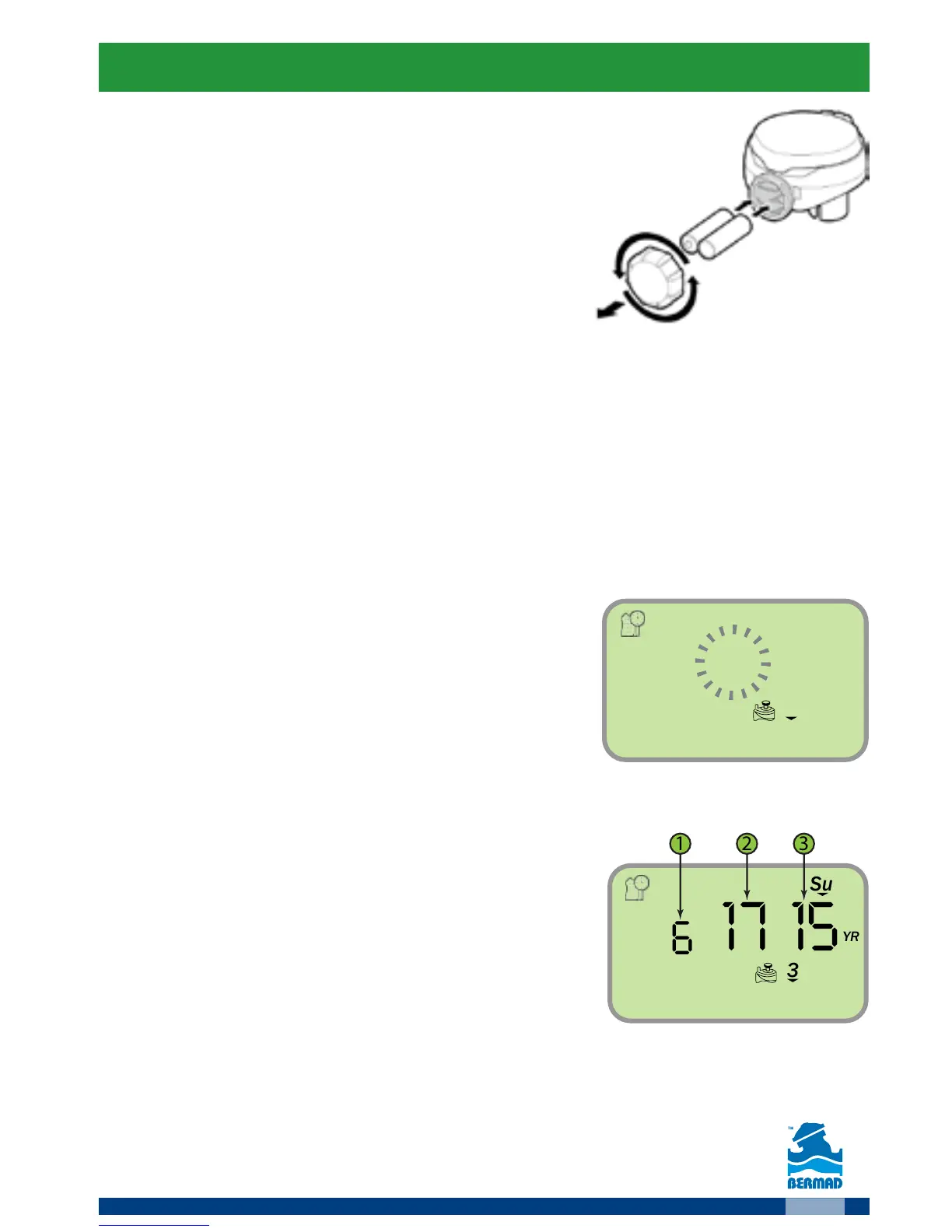
1. Open the batteries compartment cover
by turning it counter-clockwise.
2. Install two, fresh, brand name, AA alkaline
batteries (not included).
Attention: note for the proper polarity direction as marked on the bottom
of the controller’s housing.
3. Insert and screw the batteries cover clockwise. Tighten the cover firmly
with hand force only. The controller display starts with the day, PM, and
the hour digit flashing. The controller is ready for programming.
Setting the current Time and Date
Perform the following actions when the Time/Date display is flashing:
1. Use the and buttons to set the Time.
Please note the AM/PM labels as they changed after the hour 12.
2. Press the button
The minutes digits start flashing
3. Use the
and buttons to set the Minutes.
4. Press the
button to move to
the Date values display
Please note that the date format is American; Month, then Day and finally
the Year. The day of the week is automatically set according to the date set.
5. Use the
and buttons to set the Month (1).
6. Press the
button to move to the
Day value display (2).
7. Use the
and buttons to set the Day.
8. Press the
button to move to the
Year value display (3).
9. Use the
and buttons to set the Year.
10. Press the
Icon to return to the main screen.
Remark: In order to ensure proper operation make sure that the controller
time and date are matching the actual current time and date.
For setting the Time/Date press the
Icon at the main screen.



 To Next Page