Configuring Controllers | Basic Device Settings |
44
Omega | Installation and Operation Guide | Rev A | Doc P/N: PIEAE21-OMEGA
General Settings
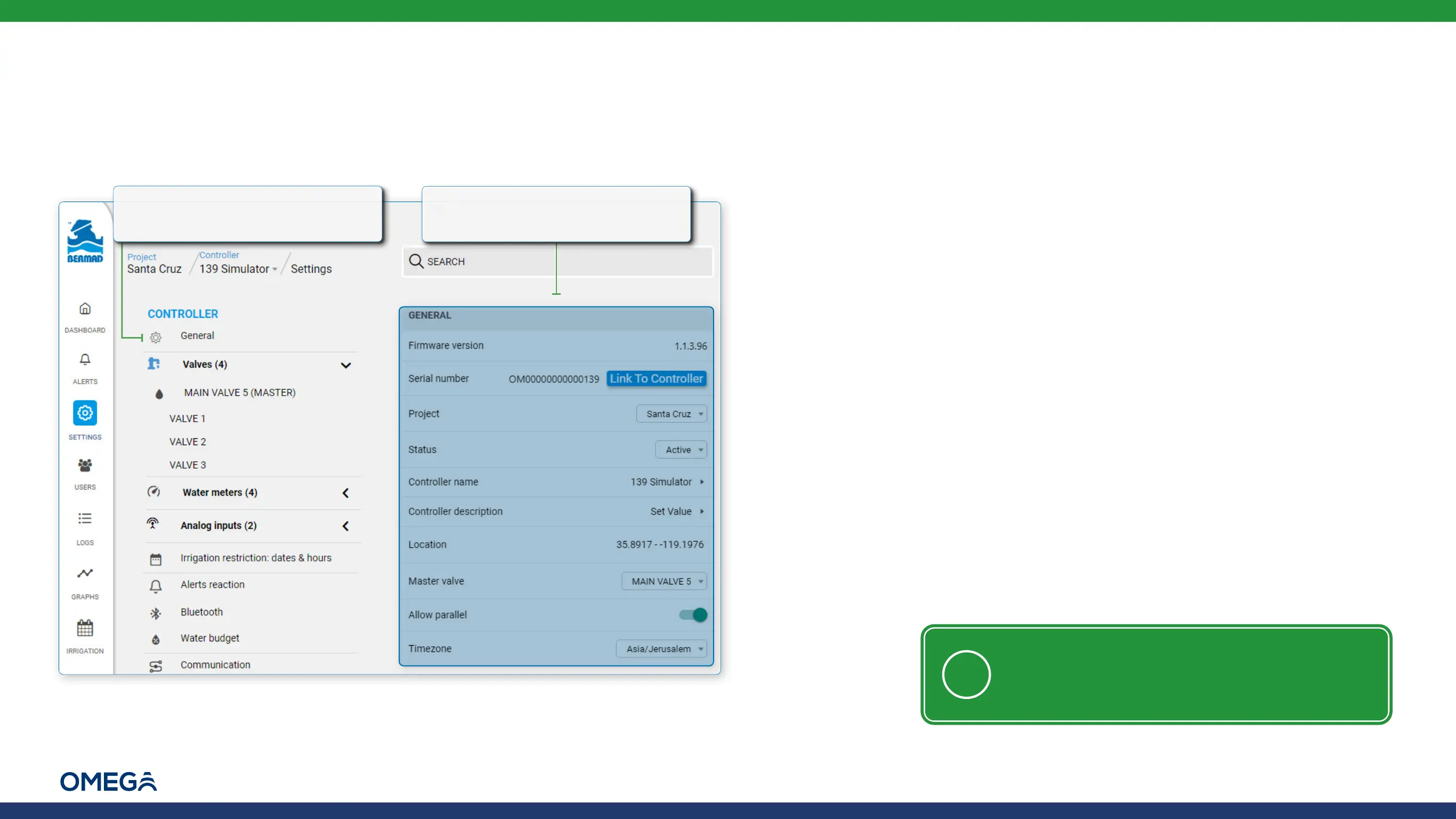
Perform the following steps to navigate to a controller's general settings:
A controller's general settings include:
Firmware version – displays the firmware version currently installed
on the controller
Serial number – displays the controller's serial number
▪ Link To Controller button – links the physical controller (installed
in the field) with the virtual controller created in the cloud, which
includes copying controller settings if a controller is replaced
Project – the project to which the controller belongs. The drop-down
list allows the user to move the controller to another project
Status – enables activating and deactivating the controller
Controller name – enables naming of the controller
Controller description – enables adding text describing the controller
Location – displays the coordinates of the controller's location.
Clicking on the line opens a map which enables moving the
controller to a new location
Master valve – enables selecting which valve is the master valve
Allow parallel programs – enables running two or more irrigation
programs simultaneously
Timezone – defines the time zone in which the controller is located
1.
From the controller settings,
select General
2.
The general settings of the
controller are displayed
NOTE: If permission to access location is
denied when clicking on the location line, in
the browser's settings allow cloud.bermad.io
to access location and then refresh the page



 To Next Page