6
2.1.2 Address Settings
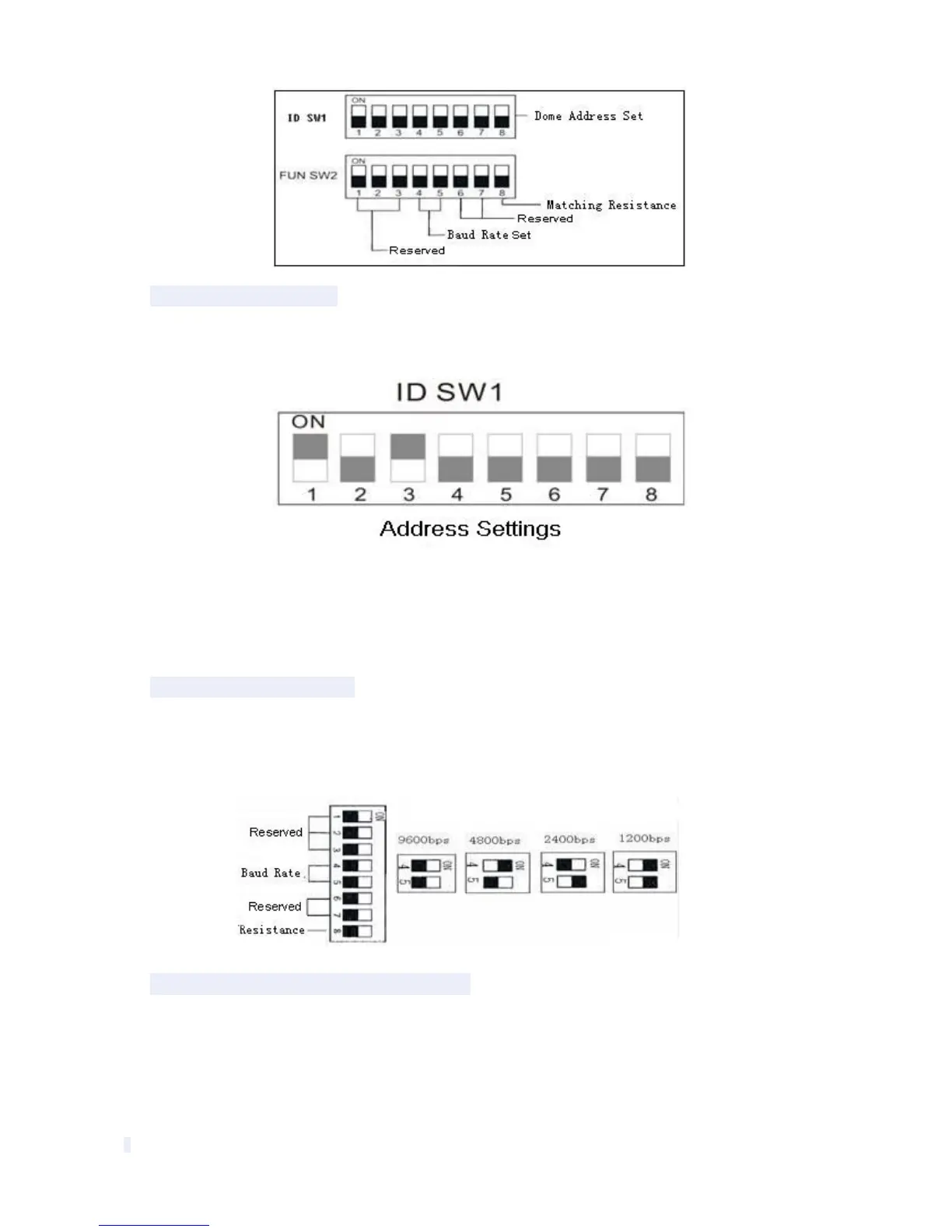
DIP switch SW1 is the address settings of camera. It is a 8-bit switch, each switch corresponds
with 0 or 1 in the Binary code. OFF status means 0 while ON status means 1.
(See illustration above) Turn on the 1st and 3rd (allocated to ON position) and get the binary
code 00000101, so the correspondence address is 5.
Detailed settings please refer to the back “Address Code Mapping Table”(appendix
Ⅳ
).
2.1.3 Baud Rate Settings
The 4th
and 5th DIP Switches set the Baud rate. Factory-default setting is 2400bps.
Baud rate: 1200bps
、
2400bps
、
4800bps
、
9600bps selectable
2.1.4 RS-485 Bus Matching Resistance
The 8
th
bit of DIP switch SW2 is to select the matching resistor. To the control center, in order to
prevent the reflection and interference of RS-485 communication signal and other signals, the
parallel matching resistor is needed in the communication interface of dome camera at the end
away from the control center.



 To Next Page