BestScope International Limited
6
Fig.12
BS-6000A/AT
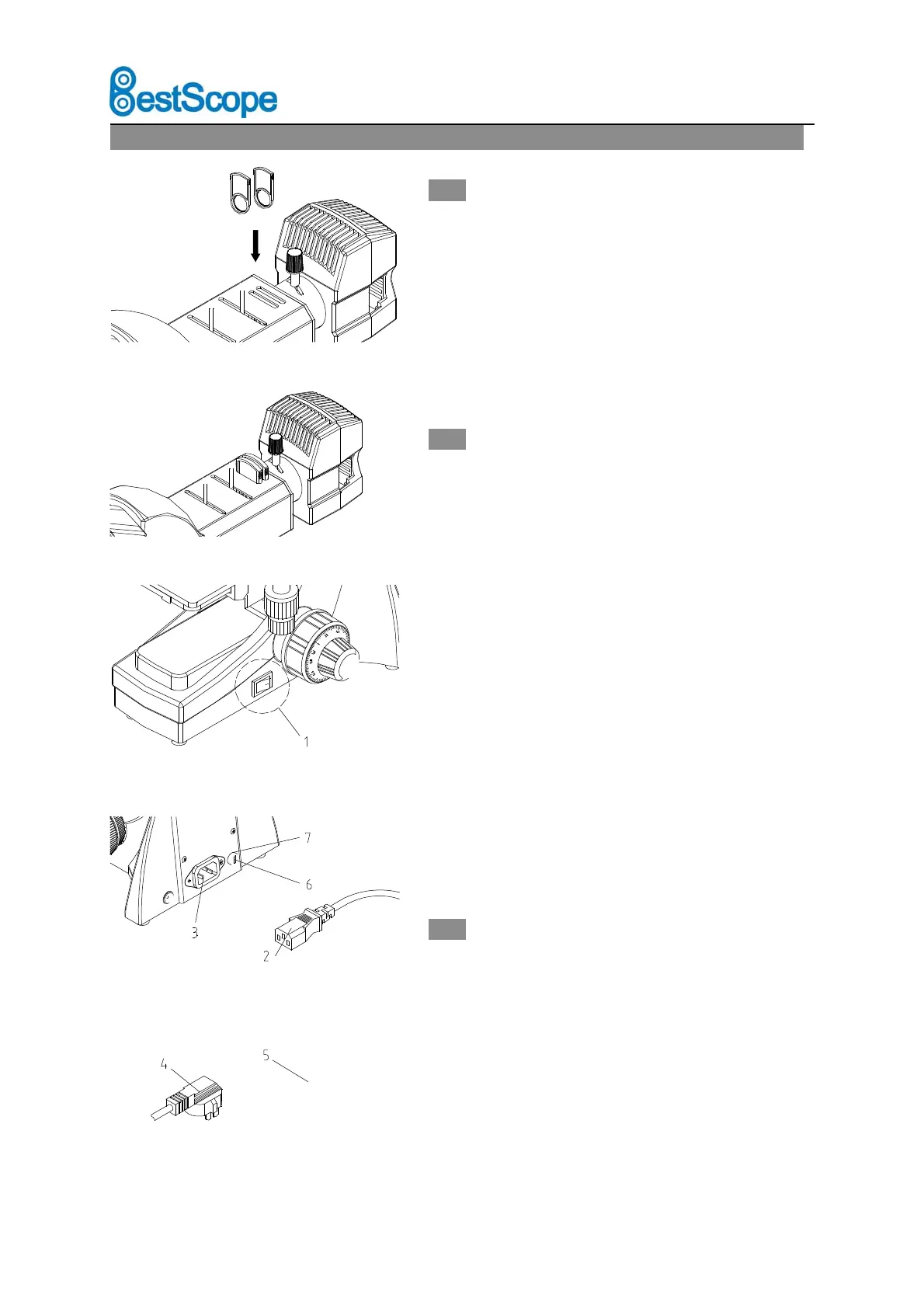
2.2.5 Install the color filter (Fig.9-10)
Put the filter into the jack of the illumination
system.
★ There is three type of color filter. The color is
blue, yellow and green.
2.2.6 Connecting the Power Cord (Fig.11-13)
★ Do not force on the Power Cord. The cable and
wire are easier to be damaged when bended or
wrapped.
1. Before connecting the power cord, switch the main
On-Off ① to “O”(off).
2. Plug the power cord② into the socket③ on
microscope safely. Make sure be connected.
3. Plug the power cord④ into the power source
socket⑤ safely. Make sure be connected.
★ Do use the supplied power cord all the time. If
lost or damaged, select the same standard cord,
please.
★ This machine has High-Band voltage. It can
adapt any voltage between 100V and 240V.
2.2.7 Replacing the fuse(Fig.11-12)
Do remember to turn the main switch① on the
state of “O”(off) before replacing the fuse, and
unplug the power cord. Rotate the fuse⑥ kits out
of the holder⑦ by the “--”type screwdriver,
replace a new fuse, then rotate back to the holder
again.
Fig.9
Fig.10
Fig.11
Fig.13



 To Next Page