0.
5"
CUT AT A
45° ANGLE
DR2000MF04
Figure 4. Cutting Chemical Feed Tubing,
Inserting into Standpipe
DR2000MF05
Figure 5. Chemical Feed Tubing (uptake side) with Standpipe in
Chemical Drum
3. Cut and connect the desired length of chemical feed line for
the chemical delivery to the right side of the pump squeeze
tube. Run the delivery tube to the desired injection point.
Avoid uphill runs greater than 10 feet (3 meters).
POWER SUPPLY
115VAC Power Cord Version
This unit comes with a standard power cord. No ground
connection is required.
DR2000MF02
Figure 6. Plugging DR-2000 into Outlet.
230VAC Power Cord Version
This unit comes pre-wired for 230 VAC with flying leads (no
plug). Qualified service personnel should wire it into to a
230VAC power source.
A 15 amp branch circuit protection (circuit
breaker) must be included in the building’s
electrical installation. It must be installed in
close proximity and within easy reach of the
DR-2000 operator. The circuit breaker must
be marked as the disconnecting device for
the DR-2000. If the equipment is used in a
manner not specified by the manufacturer,
the protection provided may be impaired.
D-Cell Battery Powered Version
This unit comes with a battery pack for 4 D-Cell batteries
(batteries not included). The D-Cell battery holder is housed in
the battery compartment.
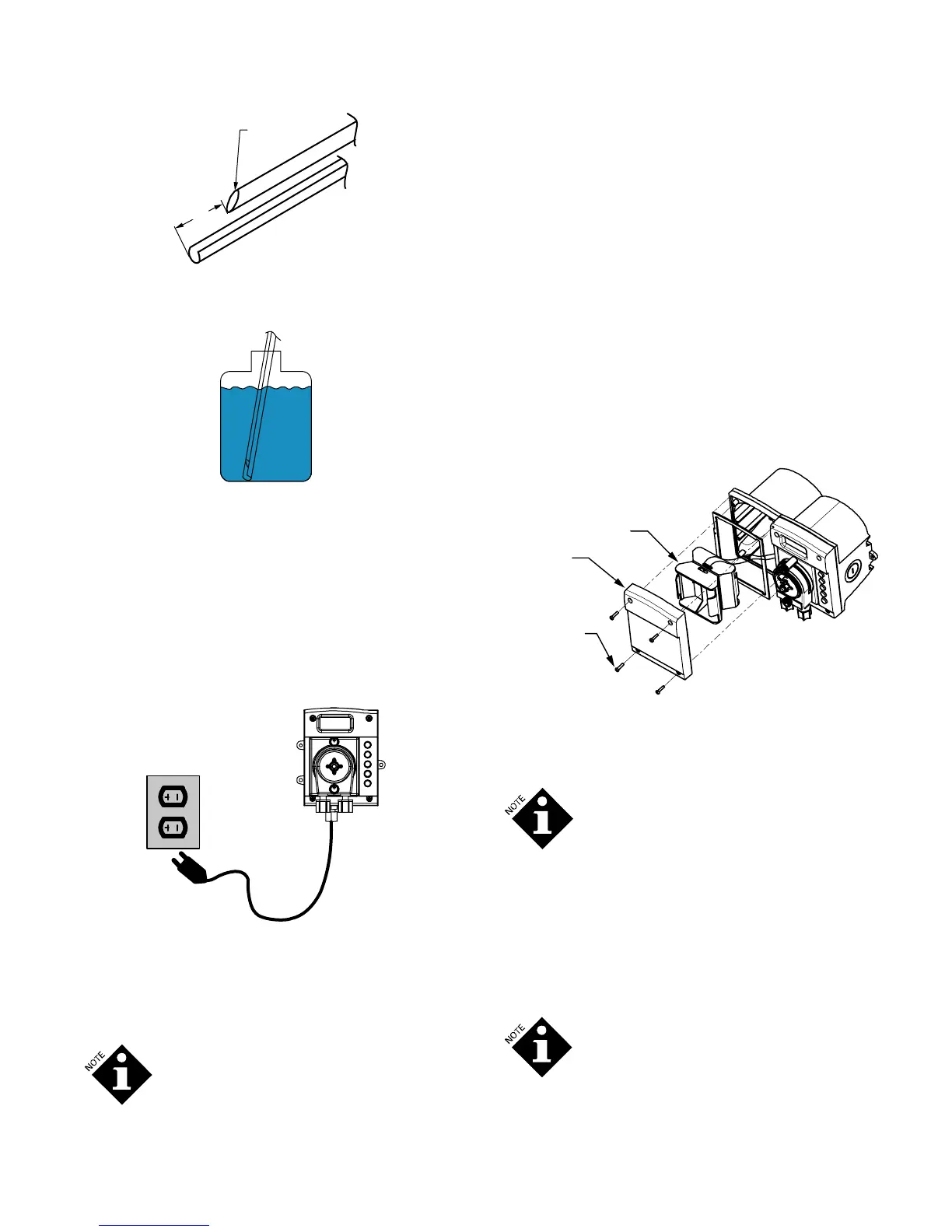
Installing the Batteries
1. Remove the 4 screws holding the battery-housing top in
place (the battery pack bezel).
2. Lift off the top and remove the battery holder, being careful
not to damage the gasket.
3. Insert 4 D-cell batteries as indicated.
4. Replace the battery holder and battery-housing top.
5. Refit and tighten the 4 screws, being careful not to damage
the gasket.
Battery Pack
Bezel (Housing)
Screws
Battery Pack
DR2000MF08.1
Figure 7. Inserting D-Cell Batteries
Ensure that the front plate is firmly in place and the screws
properly tightened to prevent moisture from entering into the
unit and to maintain the DR-2000 water resistance.
It is not necessary to remove the front of the
pump control box. The batteries are in the
battery compartment. They can be changed
without opening the pump side of the DR-
2000.
Battery Life
It is important to know that there is significant difference in
quality between commercially available D-cell batteries.
“Heavy-duty” and “Copper Top” brand batteries tend to last the
shortest length of time, while the Duracell Ultra M3 and
Energizer Max batteries can last up to ten times longer. We
recommend that you ONLY use these high-quality alkaline
batteries.
There is a 3-volt lithium battery on the main
PCB that serves as an emergency backup
power supply. This battery provides backup
power to retain the clock settings during
power loss. It provides enough power to
retain time and event date but will not run the
DR-2000 (R14735-00, Rev C) February 2010 1210730 3


 To Next Page
 Loading...