11
Date
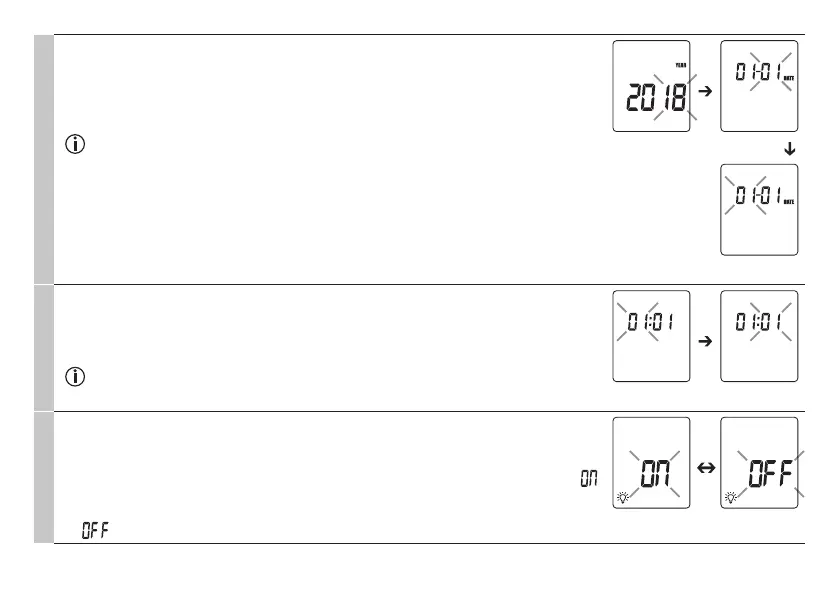
The year flashes on the display (Fig. 3).
•
Use the MODE/MEM button to set the year, and confirm with the LIGHT/SET button.
The day/month flashes on the display (Fig. 4).
•
Use the MODE/MEM button to set the day and month, and confirm with the LIGHT/
SET button (Fig. 5).
If the hour format is set as 12 h, the day/month display sequence is reversed. Be sure
to set the date and time correctly. Otherwise, you will not be able to save your meas-
ured values correctly with a date and time and access them again later.
Fig. 3 Fig. 4
Fig. 5
Time
The hour flashes on the display (Fig. 6).
•
Use the MODE/MEM button to set the hour, and confirm with the LIGHT/SET button.
The minute flashes on the display (Fig. 7).
•
Use the MODE/MEM button to set the minute, and confirm with the LIGHT/SET button.
In the 12 h format, the time is displayed with AM/PM.
Fig. 6 Fig. 7
Illuminated display
The illuminated display symbol flashes on the display (Fig. 8).
You can activate or deactivate the automatic illuminated display (appears following fore-
head temperature measurement).
•
To activate the automatic illuminated display, use the MODE/MEM button to select ,
and confirm with the LIGHT/SET button.
•
To deactivate the automatic illuminated display, use the MODE/MEM button to select
, and confirm with the LIGHT/SET button.
Fig. 8


 To Next Page