12
Illuminated display
You can also activate the illuminated display manually by briefly pressing the LIGHT/SET button.
The display lights up for 5 seconds.
The automatic and manual illuminated display cannot be used while measurement is in progress.
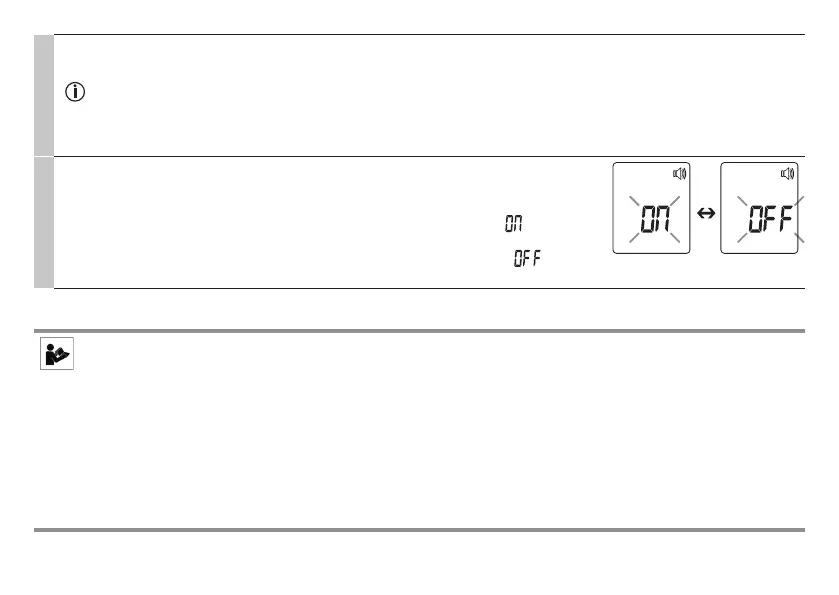
Acoustic signal
The acoustic signal symbol flashes on the display (Fig. 9).
You can activate/deactivate the acoustic signals (device activation, measurement in pro-
gress, measurement completion).
•
To activate the acoustic signals, use the MODE/MEM button to select , and confirm
with the LIGHT/SET button.
•
To deactivate the acoustic signals, use the MODE/MEM button to select , and con-
firm with the LIGHT/SET button.
Fig. 9
8. Forehead measurement
Beurer tip
Remember:
•
P
hysical activity, increased perspiration on the forehead, taking vasoconstrictive medication and skin irritations can
distort the measurement.
• T
he forehead, or the temples, must be free from perspiration and cosmetics.
• W
e recommend that you take three measurements on the forehead. If the three measurements are dierent, use the
highest value.
• I
f the forehead area is covered in hair, sweat or dirt, clean the area and then wait for 10 minutes to improve the preci-
sion of the measurement.
• I
t is important that you keep the thermometer still during measurement. Moving the thermometer during measurement
may cause imprecise measurements.


 To Next Page