16
Error mes-
sage
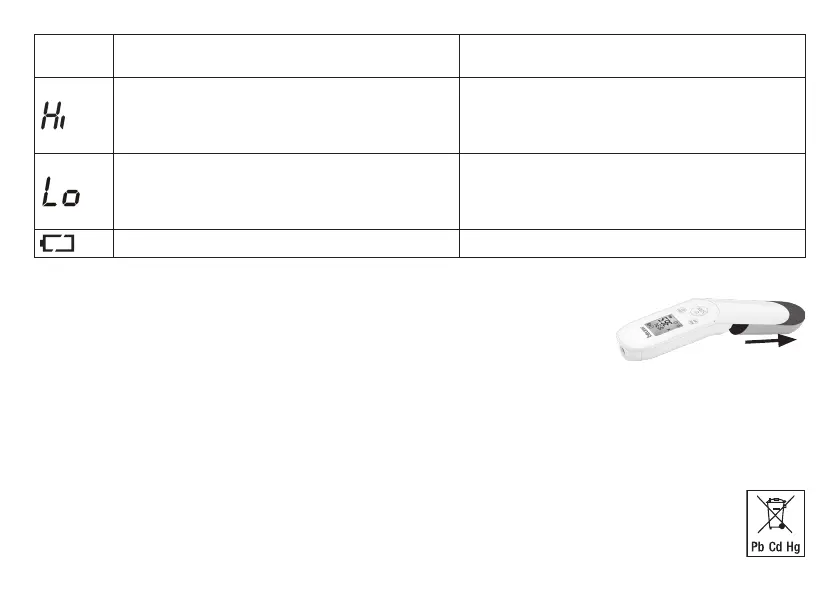
Problem Solution
(1) Forehead temperature mode: The recorded tempera-
ture is higher than 42.2 °C (108 °F).
(2) Object temperature mode: The recorded temperature
is higher than 80 °C (176 °F).
Operate the thermometer only within the specified tem-
perature ranges. In the event of a repeated error message,
contact your retailer or Customer Services.
(1) Forehead temperature mode: The recorded tempera-
ture is lower than 34 °C (93.2 °F).
(2) Object temperature mode: The recorded temperature
is lower than 0 °C (32 °F).
Operate the thermometer only within the specified tem-
perature ranges. In the event of a repeated error message,
contact your retailer or Customer Services.
The batteries are empty. Replace the batteries.
11. Batteries
Changing the batteries
The device requires two AAA (LR03) batteries.
• O
pen the battery compartment.
To do this, push the battery compartment down.
• T
ake the used batteries out of the battery compartment.
• I
nsert new batteries.
Make sure that the batteries are inserted the correct way round.
• C
lose the battery compartment.
Disposing of batteries
• E
mpty, completely flat batteries must be disposed of through specially designated collection boxes, recycling points or elec-
tronics retailers. You are legally required to dispose of the batteries.
• T
he codes below are printed on batteries containing harmful substances:
Pb = Battery contains lead, Cd = Battery contains cadmium, Hg = Battery contains mercury


 To Next Page