10
EN
AVENTHO 300 — Wireless Over-Ear Headphones
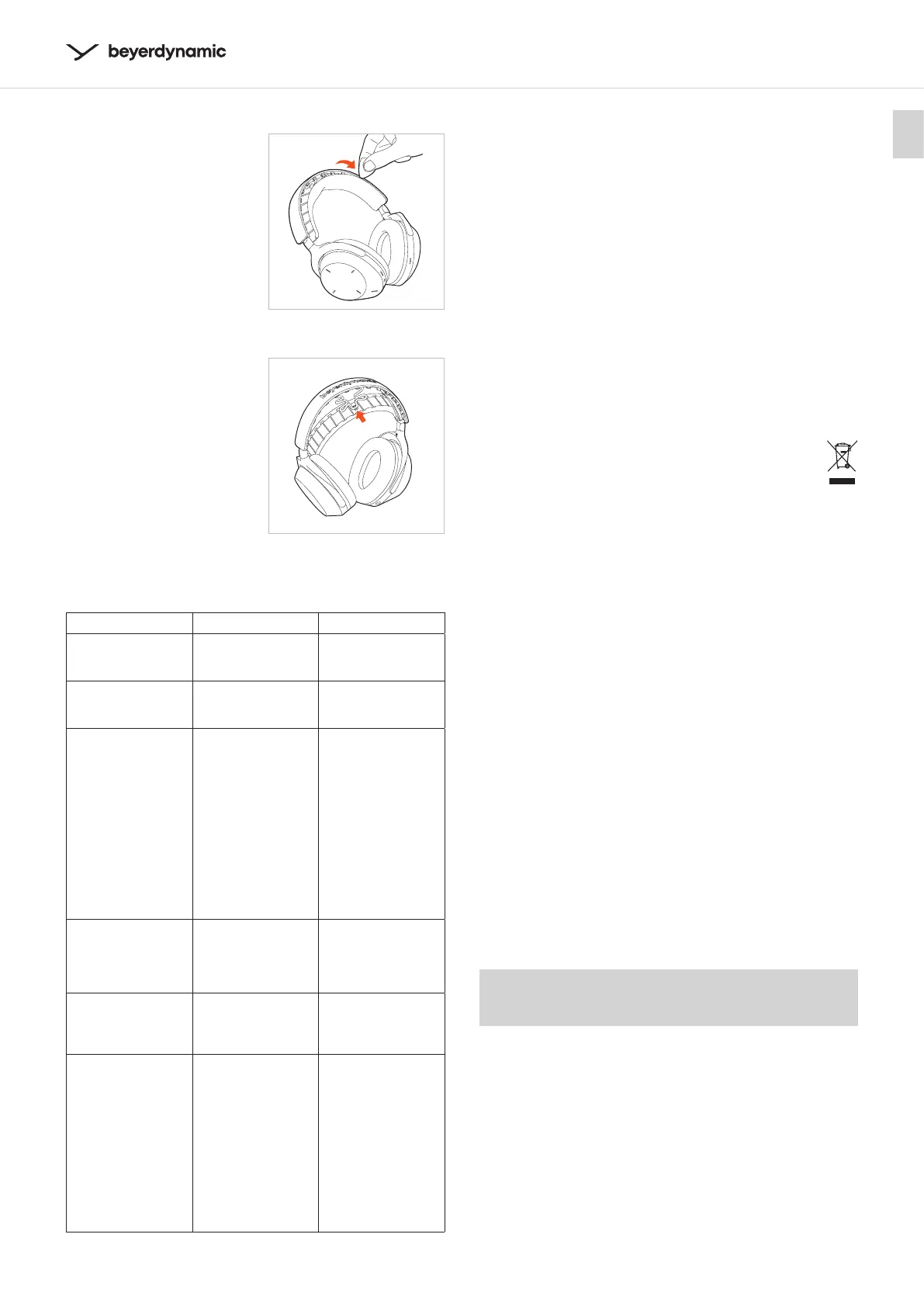
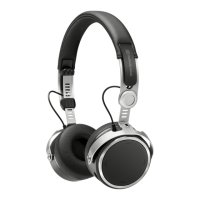
Changing the headband pad
� Inse a plectrum or
similar tool at one end
of the headband
between the pad and
the headband and li
the pad o the headband.
When you remove the
headband pad, please
note that the cable to the
ear cups is attached in
the centre of the
headband pad.
� Attach the cable to the
centre of the headband
pad before attaching
the new pad to the
headband.
The faening noses of
the headband pad mu
fully click into place
on the headband.
TROUBLESHOOTING
Problem Cause Solution
AVENTHO 300
cannot be switched
on
� Battery is empty
or almo empty.
� Charge the
battery.
No audio output
� No Bluetooth®
connection.
�
Pair AVENTHO 300
with the play-
back device.
AVENTHO 300 does
not appear among
the available
Bluetooth® devices
on the playback
device
� AVENTHO 300 is
turned o.
� AVENTHO 300 is
not in the pairing
mode.
� There exis a
Bluetooth® con-
nection to an-
other playback
device already.
� Turn on
AVENTHO 300.
� Put AVENTHO 300
into the pairing
mode.
� Disconnect the
Bluetooth®
connection to
the other play-
back device
and connect
AVENTHO 300
to the desired
device.
Playback volume is
too low, despite
the volume of
AVENTHO 300 is set
to maximum
� The received
audio signal is
too low.
� Increase the
playback volume
on the playback
device to maxi-
mum.
The sound is sharp
and the bass
response is too low
� The sealing of
the ear pads is
not suicient.
� Adju the head-
band so that the
ear pads seal as
tightly as possible.
The wireless range
is too low or the
connection is
disrupted
� There are intee-
rences with other
devices.
� Move away from
WLAN routers
and microwave
ovens.
� Make sure that
your body is
not between
the playback
device and
AVENTHO 300.
� Use a dierent
codec on the
playback device.
HELP WITH PROBLEMS / FAQ
Answers to more mo common problems and queions
can be found on the internet at:
https://www.beyerdynamic.com/aventho300 or
https://www.beyerdynamic.com/faq
PRODUCT REGISTRATION
Using the serial number, you can regier your
AVENTHO 300 on the internet at:
https://www.beyerdynamic.com/service
DISPOSAL
� This symbol on the product, in the operating
inructions or on the packaging means that
electrical and electronic devices mu be
disposed of separately from household wae
at the end of their life cycle.
� Always dispose of used equipment in accordance
with applicable regulations.
For sale within the EU only:
� For the return of old equipment, there are free
collection points or a free return to beyerdynamic,
as well as other acceptance points for reuse. The
addresses are available at the local city or municipal
adminiration.
� Dealers for electronic equipment are generally
obliged to take back wae electrical/electronic
equipment free of charge. This obligation also
applies to sales via remote communication.
� For fuher information, please contact the local
authorities or the dealer from whom the product
was purchased.
Battery disposal
� Dispose of batteries separately from the product
aer use in accordance with the applicable
regulations. They mu not be disposed of with
household wae. Returning batteries is free of
charge.
� Discharge the batteries before disposal.
Non-deructive removal of the battery by the end
user is not possible with this product. Please contact
beyerdynamic or consult independent specialis.
EU DECLARATION OF CONFORMITY
The company beyerdynamic GmbH & Co. KG hereby
declares that this radio transmission device complies
with the EU Directive 2014/53/EU.
� You will find the full text of the EU declaration of
conformity on the internet at:
https://www.beyerdynamic.com/cod



 To Next Page