Lagoon ANC – Bluetooth Headphones
9
english
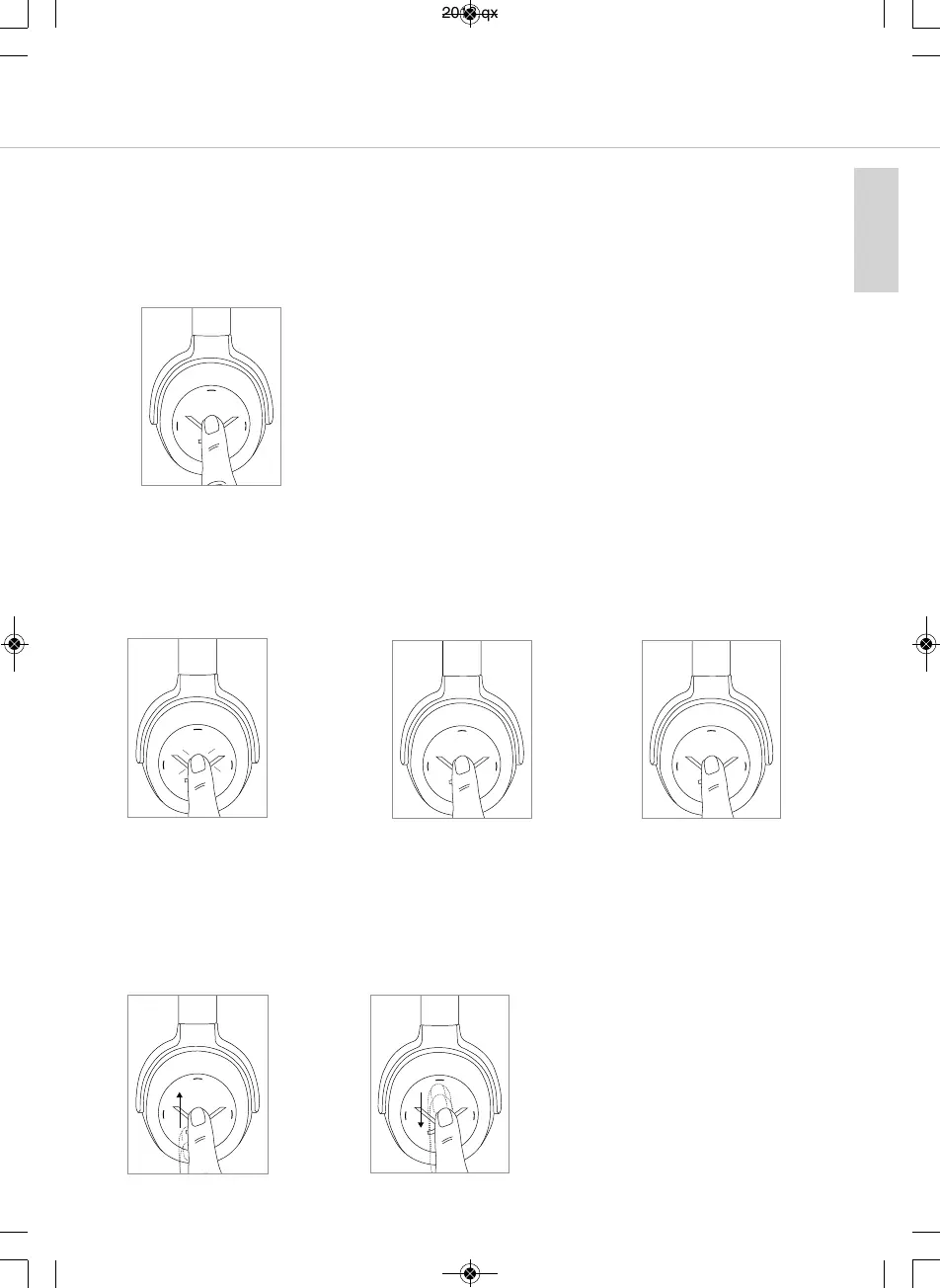
Call personal assiant
• To call the personal assiant on your
s
maphone or tablet such as Siri, Google
Assiant etc.:
Press the centre of the touch pad for approx.
2 seconds.
2 sec
Call control
• Accept / end a call:
Briefly tap the touch pad
twice.
• Reject a call:
Press the centre of the touch
pad for approx. 2 seconds.
• Toggle between two callers:
Press the centre of the touch
pad for approx. 2 seconds.
2 sec
2 sec
2 x
• Increase volume of call:
Drag your finger upwards on
the touch pad. When you
drag your finger upwards
and hold it, the volume is
gradually increased until the
maximum is achieved. An
acouic signal indicates the
achieved maximum.
• Reduce volume of call:
Drag your finger downwards
on the touch pad. When you
drag your finger downwards
and hold it, the volume is
gradually reduced until the
minimum is achieved. An
acouic signal indicates the
achieved minimum.
MAN_Lagoon-ANC-QSG_EN-DE-KO-RU_November_2018.qxp 19.11.18 09:21 Seite 9



 To Next Page