Quick Start Guide Quinta – Control Unit
20
1. Introduction
Thank you for selecting the digital wireless Quinta conference system. Please take some time to read
carefully through this manual before setting up the equipment.
Please refer also to the extensive “Quinta Conference System” manual and “Quinta Software” manual,
which you will find in the internet at www.beyerdynamic.com.
Please also refer to the supplied “Safety Information” booklet.
2. Quinta CU and RS Control Units
The Quinta RS and Quinta CU (from software version 3.0) control units can be operated in two
different modes, they can be selected via the Quinta Software. In the Conference mode all devices
(Quinta MU, Quinta TB, Quinta TH) have the functionality of a conference microphone unit, while in
the Microphone mode all devices have the functionality of a wireless microphone. For more information
please refer to the Quinta Software manual.
2.1 Controls and Indicators
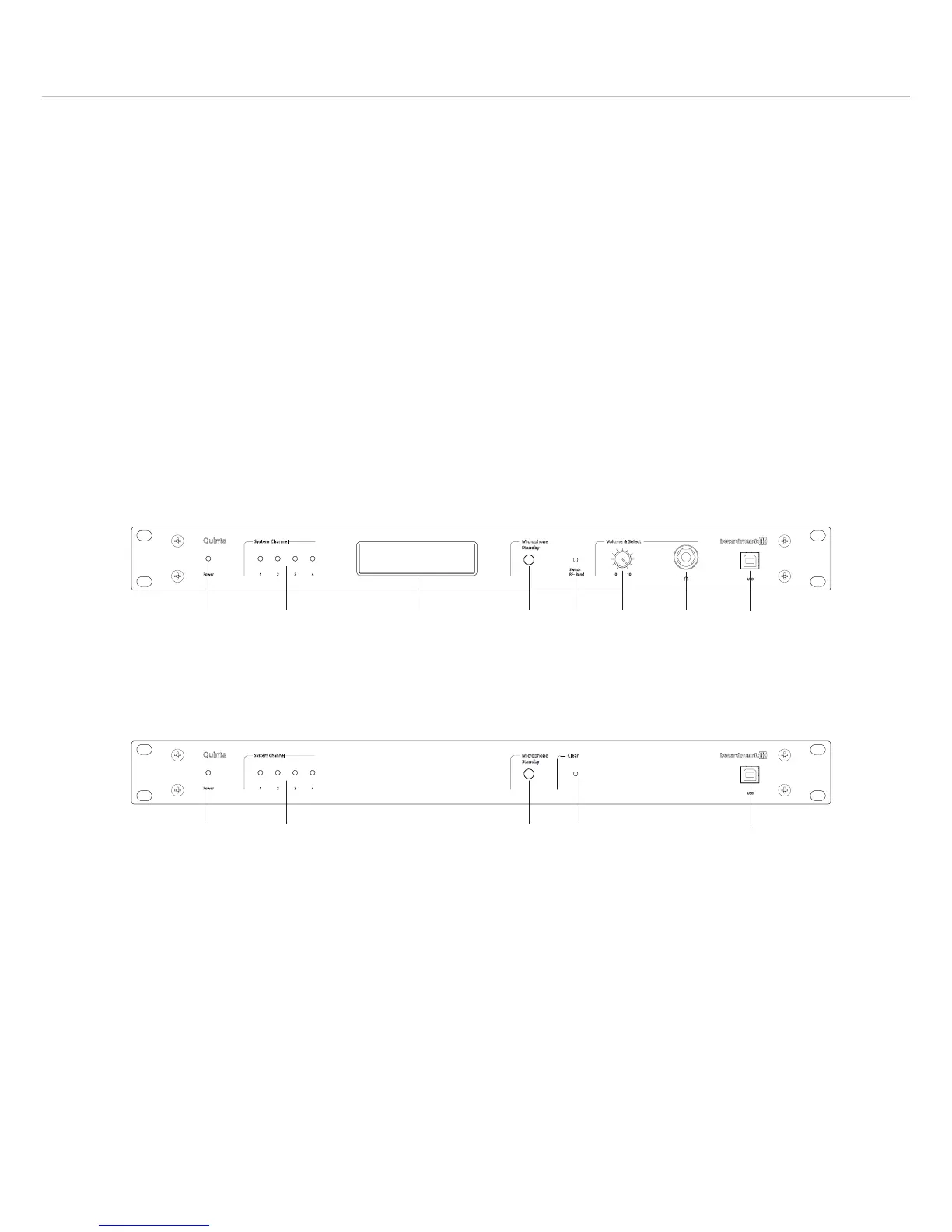
Front View – Quinta CU
Power on LED
Audio channel LEDs 1 to 4 (white = channel vacant; red = channel occupied)
Display to indicate operating mode, channel, headphone volume
Standby button to turn off all microphone units and microphones centrally
Quinta CU: Push-button for frequency band selection
Quinta RS: Push-button to clear all microphones
Volume control for headphone / channel
Headphone connection
USB connection
Front View – Quinta RS












 To Next Page