PMA 2000-DM Installation Guide page 3
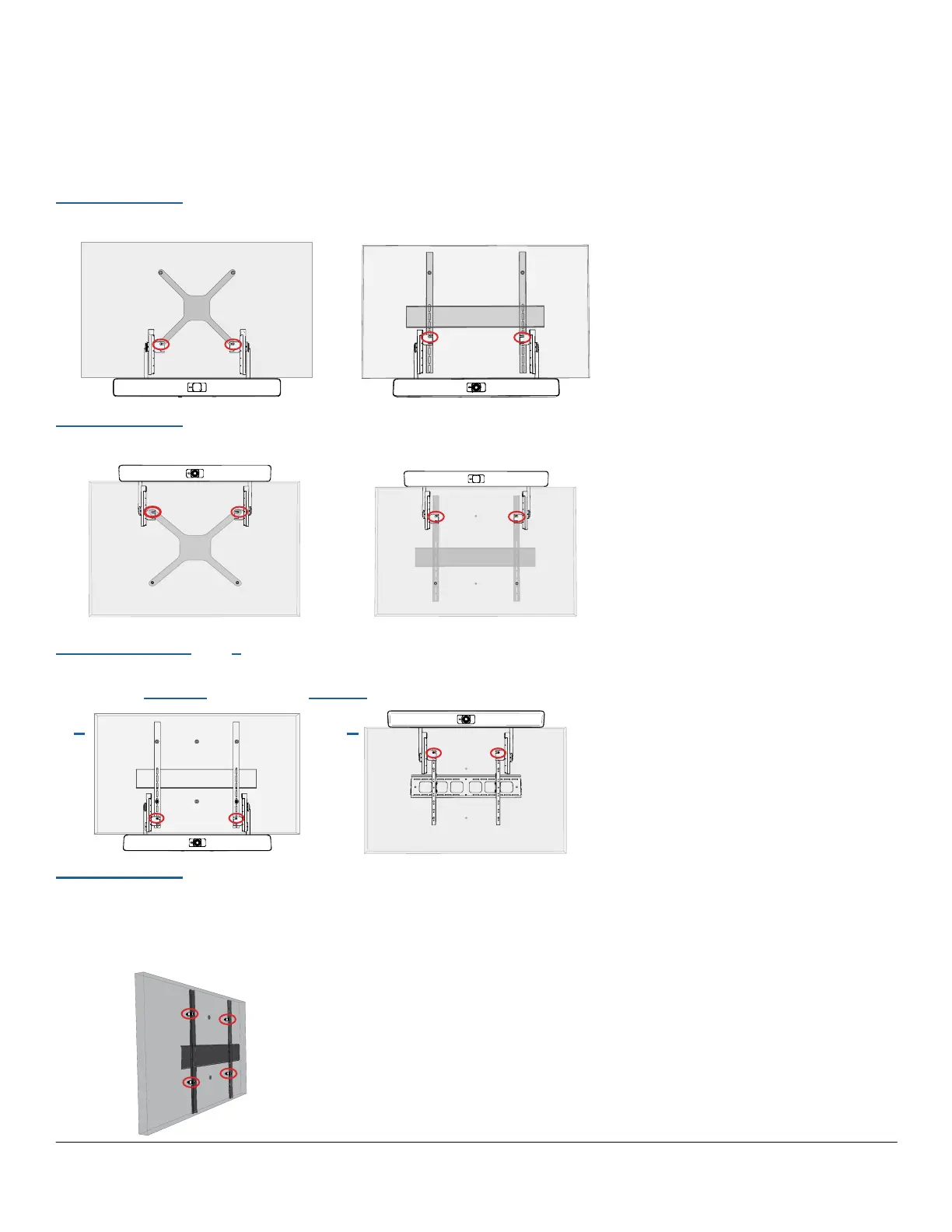
This guide covers several possible conguration options for installing the bar
on your video display (TV). Congurations 1, 2, 3, and 4 can be accomplished
without removing the display from the wall. For very low prole VESA mounts
(Conguration 5), you must remove the display from the wall to utilize the kit. Make a
choice below that matches your intended conguration.
INSTALLATION CHOICES
Conguration 1
Mount Bar BELOW the TV using the circled VESA mounting holes (pgs 4-7).
Conguration 2
Mount Bar ABOVE the TV using the circled VESA mounting holes (pgs 8-12).
Congurations 3 and 4
Mount Bar on the VESA mount's vertical rails behind the TV.
Position Bar BELOW (pgs 14-17) or ABOVE (pgs 18-23)
Conguration 5
Mount bar to a LOW PROFILE VESA mount (pg 24), then chose either Configuration
1 or 2 depending upon the desired bar location.
NOTE: This choice necessitates removal of the TV from the VESA mount to add spacers
(circled) to provide enough area for the kit arms to t behind the TV.
3 4



 To Next Page